
How to Use Cursor Without Deleting Your GitHub Repos
You've spent an hour getting everything right. The perfect prompt, the right MCP servers, Cursor configured exactly how you want it. You let the agent run.
You come back to a broken repo. A branch deleted. A file overwritten. A PR merged you never approved. The agent did exactly what you asked, just not in the way you meant.
Now multiply that across every developer on your team. Each one running their own Cursor config, their own allowlist, their own interpretation of what the agent should be able to touch. There's no shared policy and no way to know what anyone has permitted their agent to do until something breaks.
That's the problem. Here's how to fix it.
If you'd rather watch than read, the full walkthrough is in the video above.
What is Cursor, and how does it protect against this today?
Cursor is an AI-native IDE that ships with a built-in agent. That agent can do more than write code. Through the GitHub MCP server, it can read and write to your repositories directly. Create branches, merge pull requests, push files. All from a natural language prompt.
Cursor knows this is a lot of surface area, so it ships with an MCP allowlist. You can explicitly control which servers and tools the agent can call. It's a thoughtful default.
The problem is that allowlist lives on your machine. In your config. Applied to your session only.
Your teammate has their own. So does the engineer who joined last month. So does the contractor who'll be off-boarded in six weeks. There is no shared policy, no central record, and no way to know what any given developer has permitted their agent to do, until something breaks.
That's not governance. That's asking everyone to manage their own guardrails in isolation.
The gap: governing an agent you don't control
For agents you build yourself, the answer is Agent Control. You add a @control() decorator to any function you want governed, and the same policy server handles evaluation, enforcement, and audit. One control plane for every agent in the fleet.
But Cursor is a third-party tool. You can't modify how it calls GitHub. You can't add a decorator to code you didn't write.
So how do you put a policy in between?
That's exactly what Cursor hooks are for. Hooks let you run an external command at specific points in the agent loop, including beforeMCPExecution, which fires before every single MCP tool call. The hook receives the full call payload, runs whatever logic you want, and returns a simple decision: allow or deny. If it returns deny, the call never happens.
One extension point. Total control over what the agent can do with external tools.
Where Agent Control comes in
Hooks give you the intercept point. Agent Control gives you the policy layer behind it.
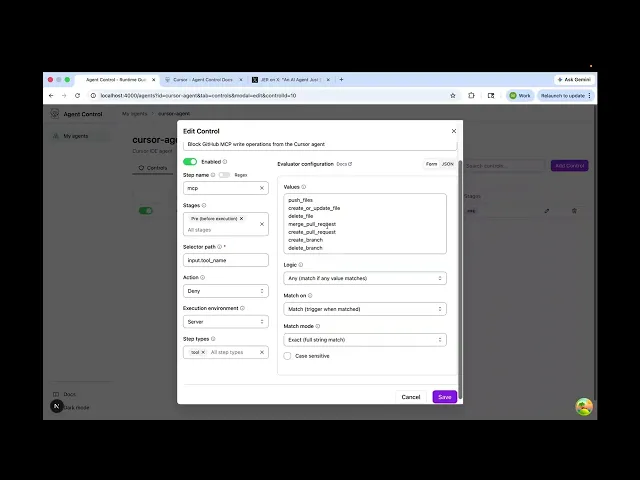
The pattern is straightforward. You register your Cursor agent in Agent Control and define a set of controls: rules that specify which MCP operations are and aren't allowed. In the case of GitHub, that might mean read tools like list_pull_requests and get_file_contents are fine, but write tools like push_files, delete_file, and merge_pull_request are blocked. You configure this once, centrally.
Then the hook script does one job: take the incoming MCP call from Cursor, send it to Agent Control for evaluation, and return the result. Allow or deny. The reason surfaces inline in the IDE so the developer knows exactly what was blocked and why.
Read tools pass through. Write tools don't. Unless you've explicitly said otherwise.
Creating a team-wide policy
Here's where it gets useful beyond the individual developer.
Cursor supports project-level hooks. Instead of configuring everything in your home directory, you can commit the hook script and configuration directly to your repo under .cursor/. Any developer who clones the repo gets the hook automatically without everyone remembering to configure their machine.
The controls themselves live on the Agent Control server. Updating a rule takes effect immediately for every developer pointing at that server. No PRs. No config drift. A security or platform team can own the policy, commit the hook files to every relevant repo, and govern what Cursor can do across the entire organization from one place.
The env var pointing at the server is the only thing each developer sets locally. Everything else is centralized.
Why this is the right architecture
Most MCP governance solutions work at the IDE level, you control what tools are visible in the first place. That's useful, but it doesn't survive onboarding mistakes, config drift, or the developer who just doesn't know the rules.
Agent Control adds a server-side enforcement layer that isn't dependent on any individual developer doing the right thing. The same controls you write for Cursor apply to your own agents, your CI pipelines, and anything else you've integrated. One control plane for the whole fleet. Cursor just becomes one more agent it governs.
The full step-by-step setup including the hook script, control configuration, and environment variables is in the Agent Control docs for Cursor. If you're new to Agent Control, start here.
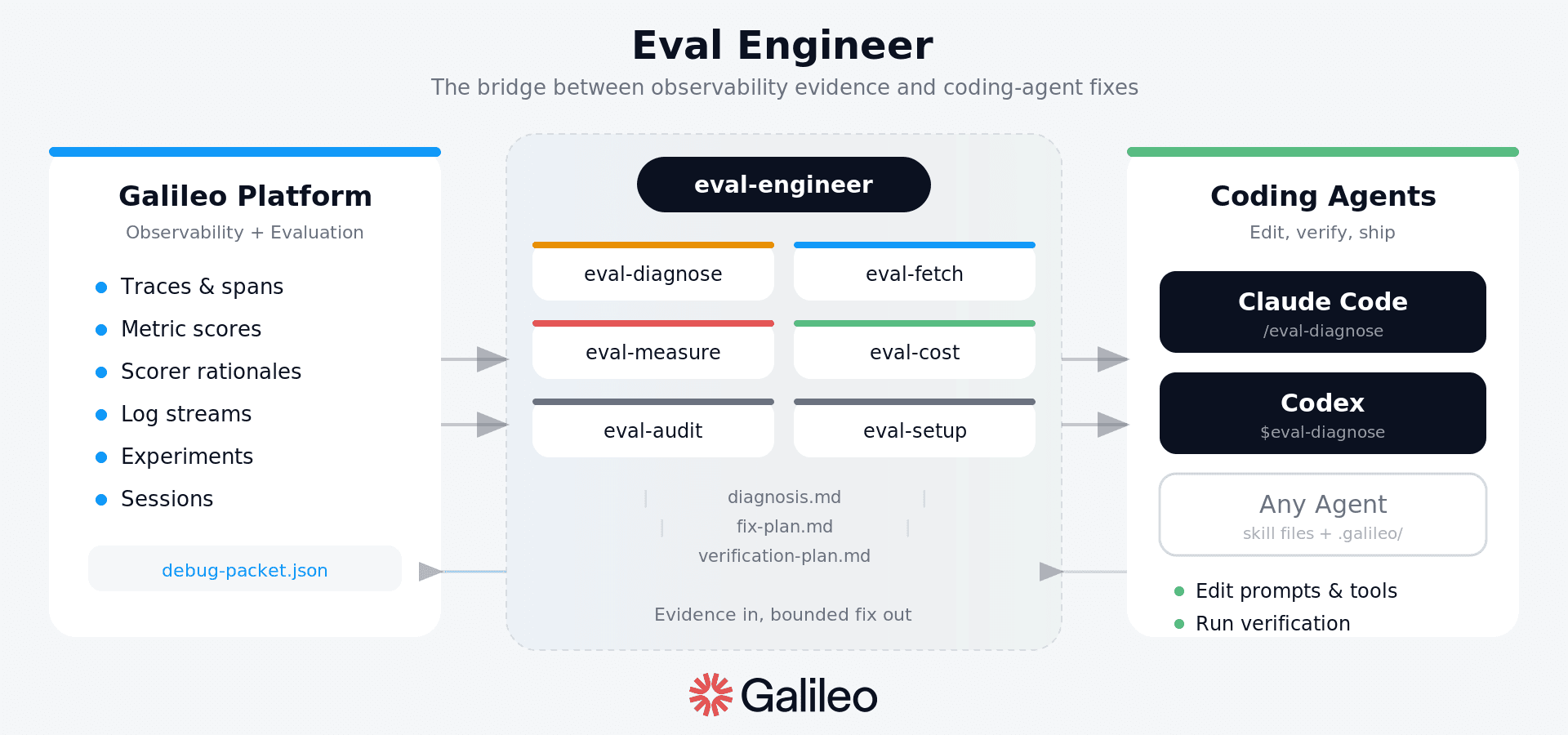
Apart from this, you also need to learn from what the agent actually did. This is where Eval Engineer becomes useful. Agent Control gives you the enforcement layer: what the agent is allowed to do. Eval Engineer gives you the improvement loop after the agent runs: inspect traces, understand failures, measure quality, cost, latency, and safety, then propose a bounded fix with a verification plan.
Together, they turn agent adoption from individual IDE configuration into an operating model with repeatable eval-driven improvement with Cursor, Claude Code, Codex, and the agents your team builds itself.
Try our alpha release today: https://github.com/Galileo-Agent-Labs/eval-engineer

Michael Branconier