Introducing Eval Engineer: Bringing Eval Expertise to Claude and Codex

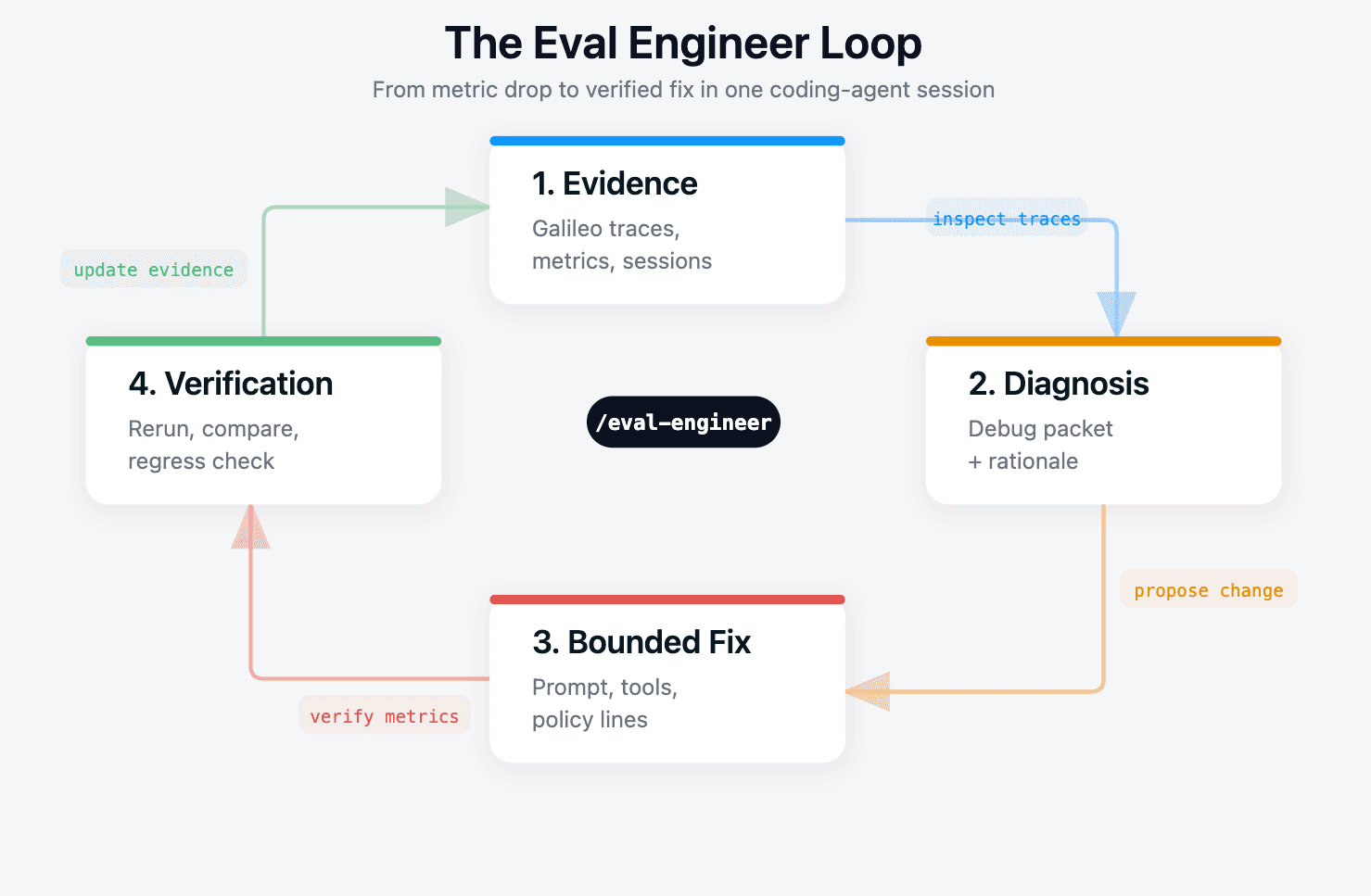
Your production agent started routing billing disputes to general support last night. A Galileo log stream shows tool selection quality at 0.33 on the affected production slice, down from 0.80 the week before. You have a bad session open in one tab and the agent's system prompt in another.
The codebase knows how the app is built. Galileo knows how the app behaves. Eval expertise tells you which evidence matters, how to turn a failure into a reusable eval case, and where a fix belongs.
Most developers do not carry all three contexts at once. That is the gap Eval Engineer is trying to close.
Agent observability tells you what happened. Eval engineering tells you what to do next. Eval Engineer turns that workflow into executable skills inside the coding agent.
Eval Engineer is a skill bundle for Claude Code and OpenAI Codex that closes that gap. You point it at the Galileo evidence and ask it to diagnose. It produces three artifacts: a diagnosis, a bounded fix plan, and a verification plan with the exact commands needed to prove the fix worked.
It does not own the agent. It does not own the codebase.
It owns the small, repeatable workflow between "metric dropped" and "PR ready for review."
This post covers what Eval Engineer is and how to install it. We walk through what each command does and run one full production RCA loop from a Galileo log stream on a simple billing-support agent.
Try our alpha release today: https://github.com/Galileo-Agent-Labs/eval-engineer
Why Galileo evidence matters
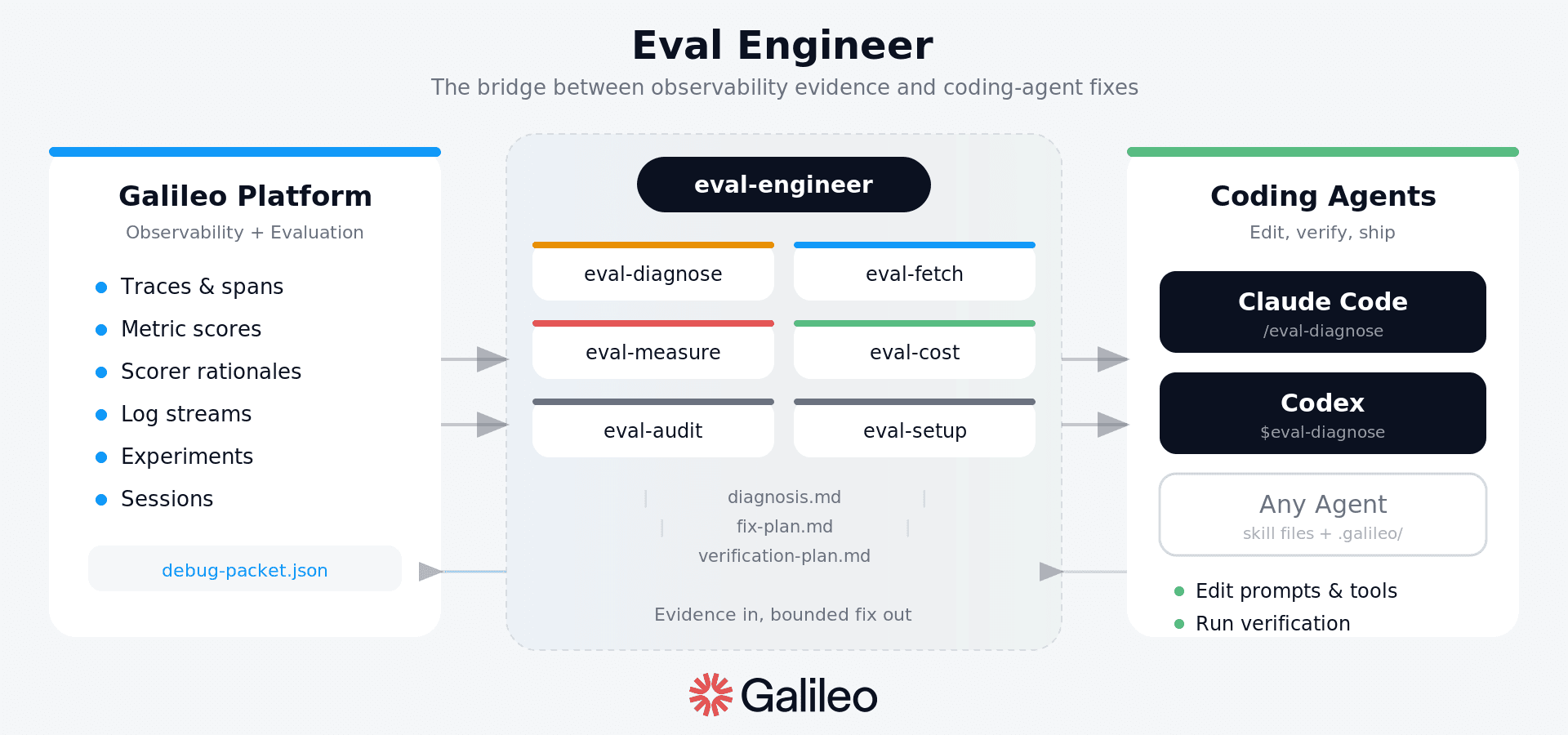
Eval Engineer depends on Galileo because a useful fix loop needs more than a failing answer. It needs evidence at the level where the agent actually made the mistake.
The metrics tell you which behavior regressed. Traces and spans show where the behavior came from: model calls, tool calls, retrieval steps, rerankers, planners, self-checks, and handoffs. Scorer rationales explain why a case failed instead of only reporting that it failed. Log streams make the workflow usable for production RCA, where the starting point is usually a URL, a bad session, a time window, or a metric drop in live traffic.
Eval Engineer turns that evidence into a small working set in the repo. The coding agent does not need the whole dashboard pasted into chat. It needs the source IDs, failing cases, metric movement, expected behavior, actual behavior, and enough trace context to propose a bounded change and verify it against the same contract.
That matches the workflow in Galileo's Eval Engineering book: start with observed behavior, tune the eval against expert judgment, and keep difficult cases as reusable evidence. The book puts it plainly: "An eval is only as good as its tuning." Eval Engineer brings that discipline into the repo, where the fix is being made.
Installation
Eval Engineer is open source and ships as a small Python installer plus a set of repo-local skill files. The install does not require Galileo credentials and does not require you to set a Galileo project. Credentials are only needed later when a skill run fetches or writes Galileo evidence.
# From the agent repo you want to debug or improve
# From the agent repo you want to debug or improve
cd your-agent-repo

uvx --from git+https://github.com/Galileo-Agent-Labs/eval-engineer.git \
  eval-engineer install --target both --scope project --project-dir
The installer writes the command skills into .claude/skills/eval-* for Claude Code and .agents/skills/eval-* for Codex. It also prepares a minimal .galileo/ working set without overwriting existing files. After installing, open or restart Claude Code or Codex from the same project folder so the host agent can discover the project skills.
By the end of the install, you have a repo that looks like this:
your-agent-repo/
  .galileo/
    config.yml
    current/                  # active evidence and skill output
    sessions/                 # append-only history
    eval-dataset/
    learnings.md
  .claude/skills/eval-*       # Claude Code command skills
  .agents/skills/eval-*       # Codex command skills
Edit .galileo/config.yml to tell the skills which files they are allowed to edit, which verification commands to run, and where current evidence lives. You do not need to hardcode a Galileo project into the repo just to install the skills.
Skills and what each one does
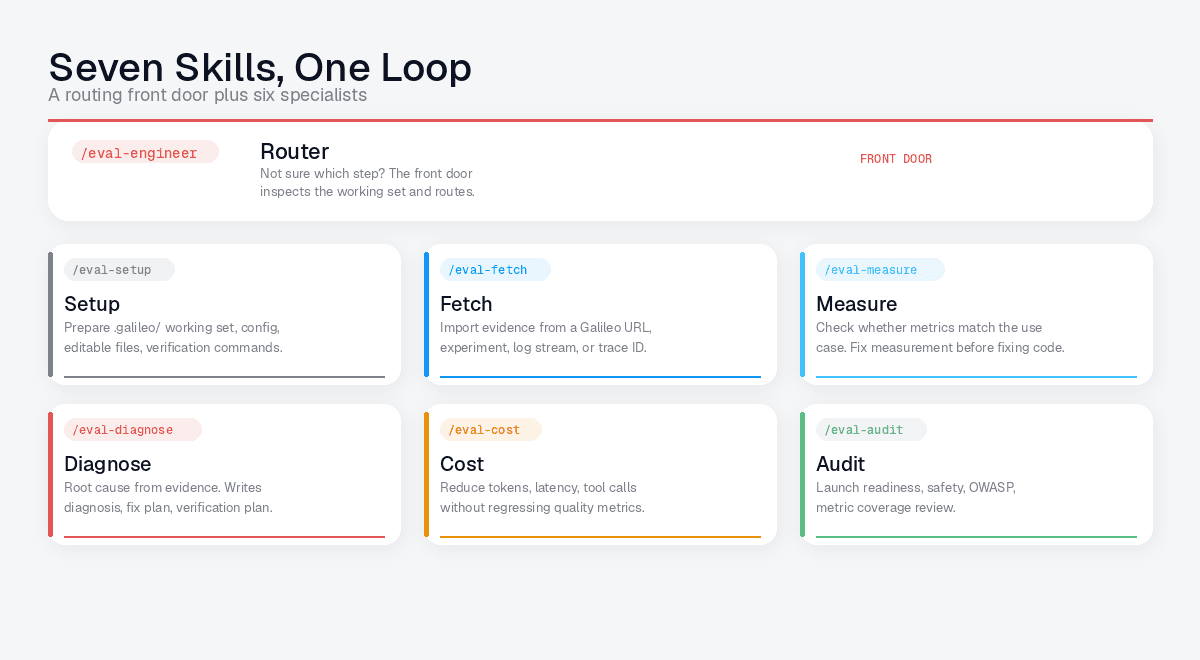
Eval Engineer is split into a routing front door plus a small set of specialists. They are installed as skills and also exposed as commands: slash commands in Claude Code and $ command-style mentions in Codex.
Skill / command | Use it when |
eval-engineer | You are not sure which step is next. The front door inspects the working set and routes. |
eval-setup | The repo needs a .galileo/ working set, config, editable files, or verification commands. |
eval-fetch | You have a Galileo log-stream URL, production session, trace ID, time window, or exported packet, and need compact evidence pulled into .galileo/current/. |
eval-measure | The score looks off, but you are not sure whether the metric or the eval case is the problem. |
eval-diagnose | A debug packet is ready, and you want a root cause plus a bounded fix plan. |
eval-cost | You want to reduce tokens, latency, tool calls, retrieval, model, or evaluator spend without regressing quality. |
eval-audit | You need a launch-readiness, safety, metric coverage, or production-readiness review. |
You can invoke the front door naturally, or call a focused command directly. In Claude Code, use /eval-diagnose. In Codex, use $eval-diagnose. The command reads .galileo/current/ and writes its artifacts back into the same place.
The same loop applies beyond tool routing. For RAG systems, eval-measure can check whether the metric profile covers groundedness, retrieval quality, answer completeness, citation behavior, and abstention. For cost work, eval-cost compares token, latency, model, retrieval, rerank, tool-call, retry, and evaluator movement against the quality metrics that must not regress. For launch readiness, eval-audit can review metric coverage, traceability, safety, and agentic AI risks.
Lets fix an agent with Eval Engineer
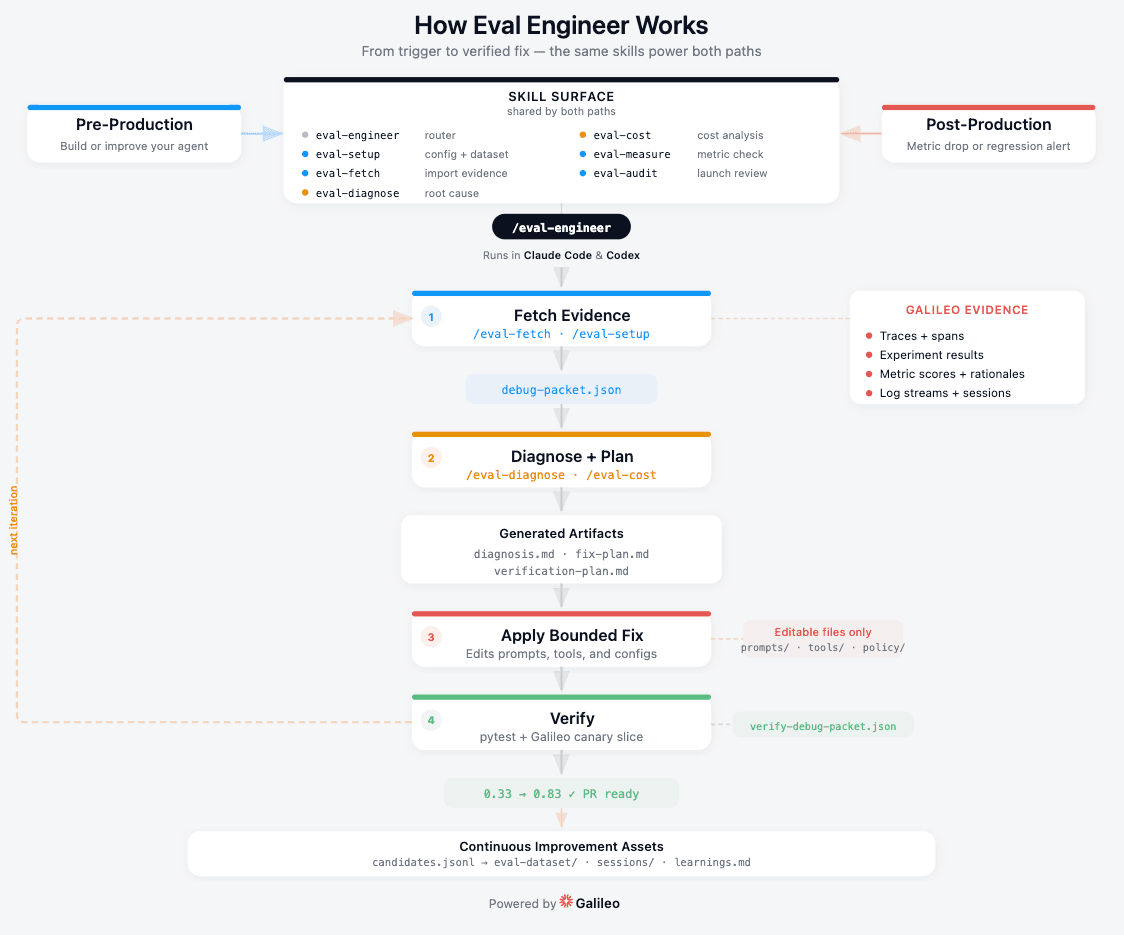
Here is one full loop on a small billing-support agent from a production Galileo log stream. The point is not the specific app. The point is the operating model: bring production evidence into the repo, diagnose from traces and metrics, make one bounded change, and verify the same contract on a fresh production or canary slice.
The setup. The agent has four tools. escalate_to_billing covers charges, refunds, and billing disputes. escalate_to_support covers product issues, login problems, and general help. lookup_invoice reads invoice records. send_invoice_copy emails a customer a copy of an invoice.
A production customer sends this message:
The expected behavior is one tool call: escalate_to_billing(reason="incorrect_charge").
What actually happened. The agent called escalate_to_support(reason="billing_question"). In the Galileo log stream for the last six hours of production traffic, billing-dispute cases are clustered among the lowest tool_selection_quality traces. The dashboard flags the regression, and you open Claude Code in the agent's repo.
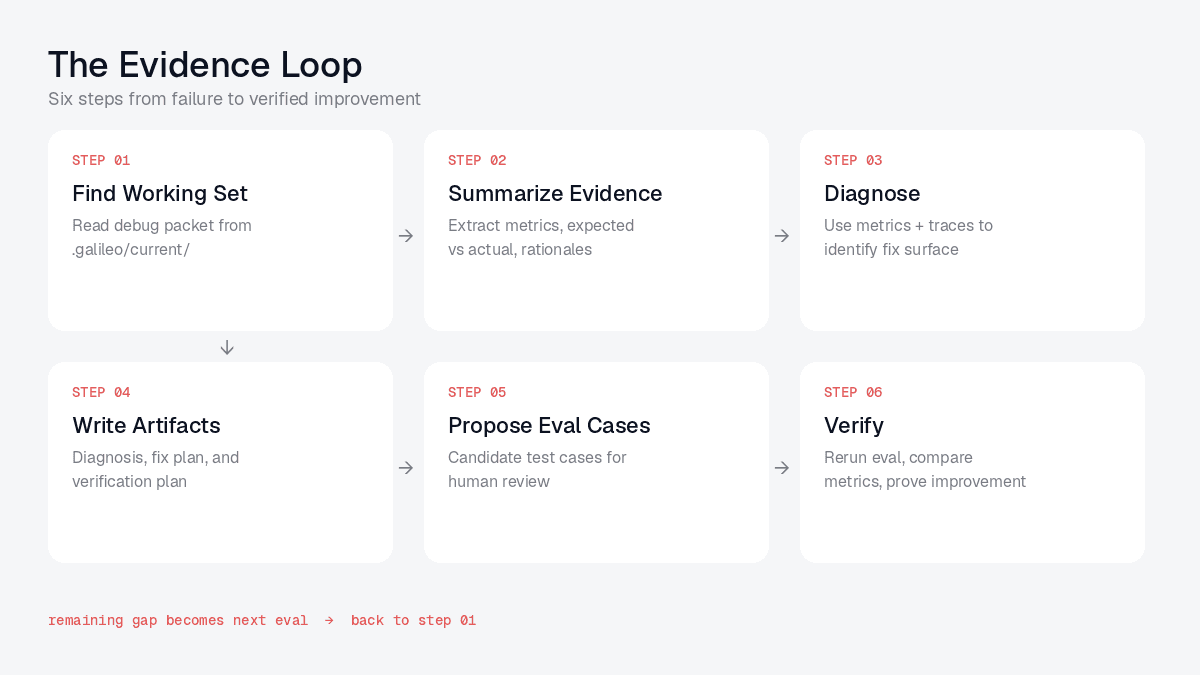
Step 1: Let the router inspect the repo. You open Claude Code in the agent repo and ask:
/eval-engineer inspect this project and tell me the best next step.
In Codex, the same action is:
$eval-engineer inspect this project and tell me the best next step.
Eval Engineer checks .galileo/config.yml, .galileo/current/, and the configured verification commands. In this example, there is no current debug packet yet, so the router points you to /eval-fetch.
Step 2: Bring in Galileo evidence. You start from the production artifact you already have: a log-stream URL, a bad session, a trace ID, or a time-bounded metric slice. For a Galileo log stream, the command looks like:
/eval-fetch https://app.galileo.ai/.../log-streams/<log-stream-id>
If the URL is too broad, /eval-fetch asks for the missing production slice: time window, latest-N traces, failed traces, specific session, target metric, or comparison window. The result is a compact packet in .galileo/current/debug-packet.json. The packet is tens of kilobytes, not a raw trace dump. It carries the Galileo log-stream ID, failing production cases, expected versus actual behavior, scores, trace/span IDs, and enough context for a coding agent to reason without loading the whole dashboard into chat.
Step 3: Diagnose. With evidence in place, you run:
/eval-diagnose diagnose the current debug packet.
eval-diagnose writes three artifacts. Here is what .galileo/current/diagnosis.md looks like in this example:
# Diagnosis: support-agent production log stream, 2026-05-12T12:00Z-18:00Z

## Failing metric
- tool_selection_quality = 0.33 (target ≥ 0.80)
- Failing production slice: billing-dispute sessions

## Root cause
The agent called escalate_to_support when the expected
behavior was escalate_to_billing. The user's message is
unambiguously a billing matter (a disputed charge). The
scorer rationale on the LLM span confirms the routing
was wrong.

## Scorer rationale
"Billing dispute should route to escalate_to_billing per
the tool's stated purpose. The selected tool,
escalate_to_support, covers product, login, and general
help, not money issues."

## Evidence
- Trace: 84881432-c569-4018-9802-57538f2c3375
- LLM span: 15f19421-d39d-4120-9c14-fef9092059a3
- Log stream: billing-support-prod
- Session: customer-billing-dispute-20260512-1432
- Packet: .galileo/current/debug-packet.json
The skill follows up with fix-plan.md:
# Fix Plan

## Change 1: tools/descriptions.yml
Tighten the escalate_to_support description so it cannot
swallow billing cases.

Before:
"Use for product issues, login problems, general help, or
any case where the customer needs assistance."

After:
"Use for product issues, login problems, or general help.
Do NOT use for charges, refunds, or billing disputes;
those route to escalate_to_billing."

## Change 2: prompts/system.md
Append one routing rule at the end of the escalation
section:
"When in doubt between billing and support: money issues
go to billing."

## Edit scope
- tools/descriptions.yml (in editable_files)
- prompts/system.md (in editable_files)
And verification-plan.md:
# Verification Plan

## Local check
python -m pytest tests/agent/test_routing.py::test_billing_disputes

## Galileo check
Run the project's configured verification command from .galileo/config.yml.
For this repo, that command sends a small canary slice through the same
production log stream and writes:
  .galileo/current/verification-debug-packet.json

Compare against .galileo/current/debug-packet.json:
- tool_selection_quality:        0.33 -> expect >= 0.80
- agentic_workflow_success:      0.50 -> expect >= 0.75
- Watch for regression on non-billing cases

## Dataset action
This is a clean billing-vs-support routing failure.
Propose as candidate eval case in:
  .galileo/eval-dataset/candidates.jsonl
Status: candidate (human review required)
Step 4: Apply and verify. You read the diagnosis and the fix plan, decide both changes are reasonable, and tell Claude:
The coding agent edits tools/descriptions.yml and prompts/system.md within the bounds declared in .galileo/config.yml. It does not touch application code, the agent framework, or the model. You run the local check and the Galileo verification command that your repo already defines. In this example, the verification command logs a fresh canary slice into Galileo and exports a new compact packet. Eval Engineer does not require a special galileo-eval run command or a hardcoded Galileo project setting to do this.
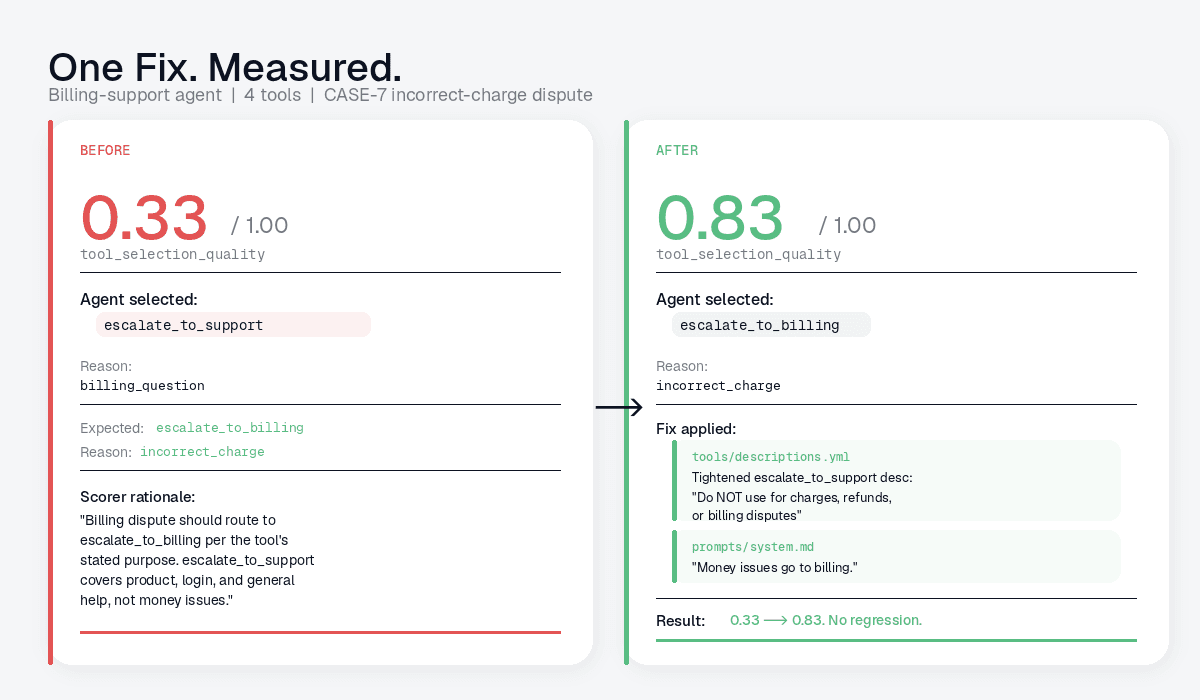
When the verification packet lands, eval-engineer compares baseline and after-change evidence:
Verification result:
- tool_selection_quality:   0.33 -> 0.83
- agentic_workflow_success: 0.50 -> 0.81
- No regression on adjacent case categories
- Candidate eval case proposed (awaiting human accept)
You ship the PR. The entire loop, from "metric dropped overnight" to "verified fix in review," ran through your normal coding-agent chat without you leaving the editor.
The concrete artifacts are the important part. A useful run should leave behind:
Those files make the agent's reasoning auditable. A reviewer can see the original evidence, the claimed root cause, the proposed edit scope, and the before/after packet used to decide whether the change was worth keeping.
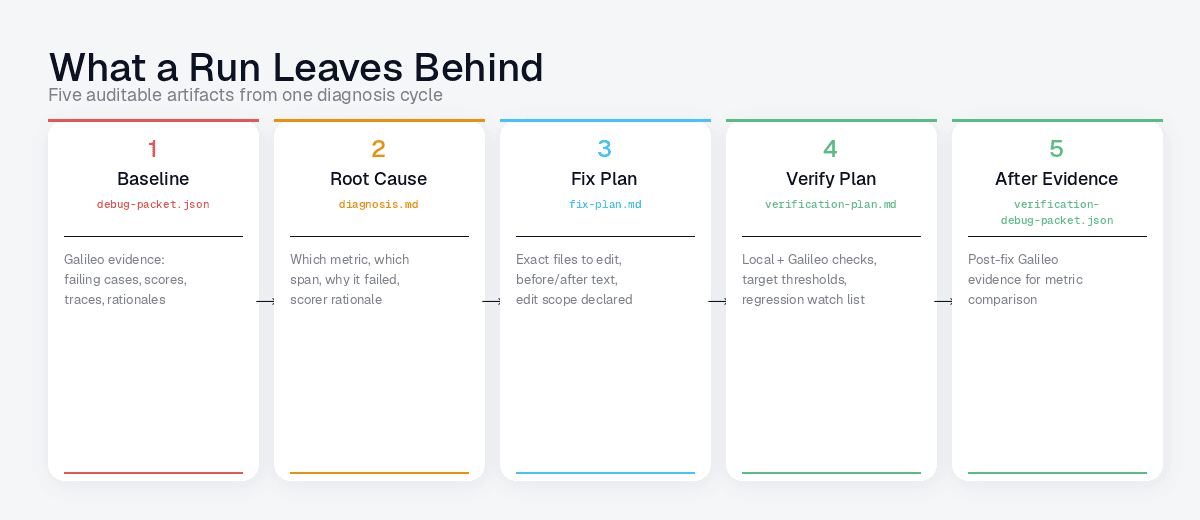
This is also where subject-matter expertise stays in the loop. A production failure can become a candidate eval case, but it should not silently become permanent ground truth. The human review step mirrors the Eval Engineering book's SME annotation loop: experts validate the examples and labels that future automation will rely on.
Why this is worth your time
There are three reasons we think this loop is worth adopting now.
It lives where developers already work. The skill runs inside Claude Code and Codex through their normal skills systems, with no extra dashboard to learn. The coding agent reads, edits, and reruns; the skill handles the framing.
It produces verifiable artifacts. Every diagnosis cites the trace and span IDs. Every fix plan cites the files it edited, and every verification plan cites the exact commands and metrics to check. If a teammate inherits the session, the artifacts tell them everything they need.
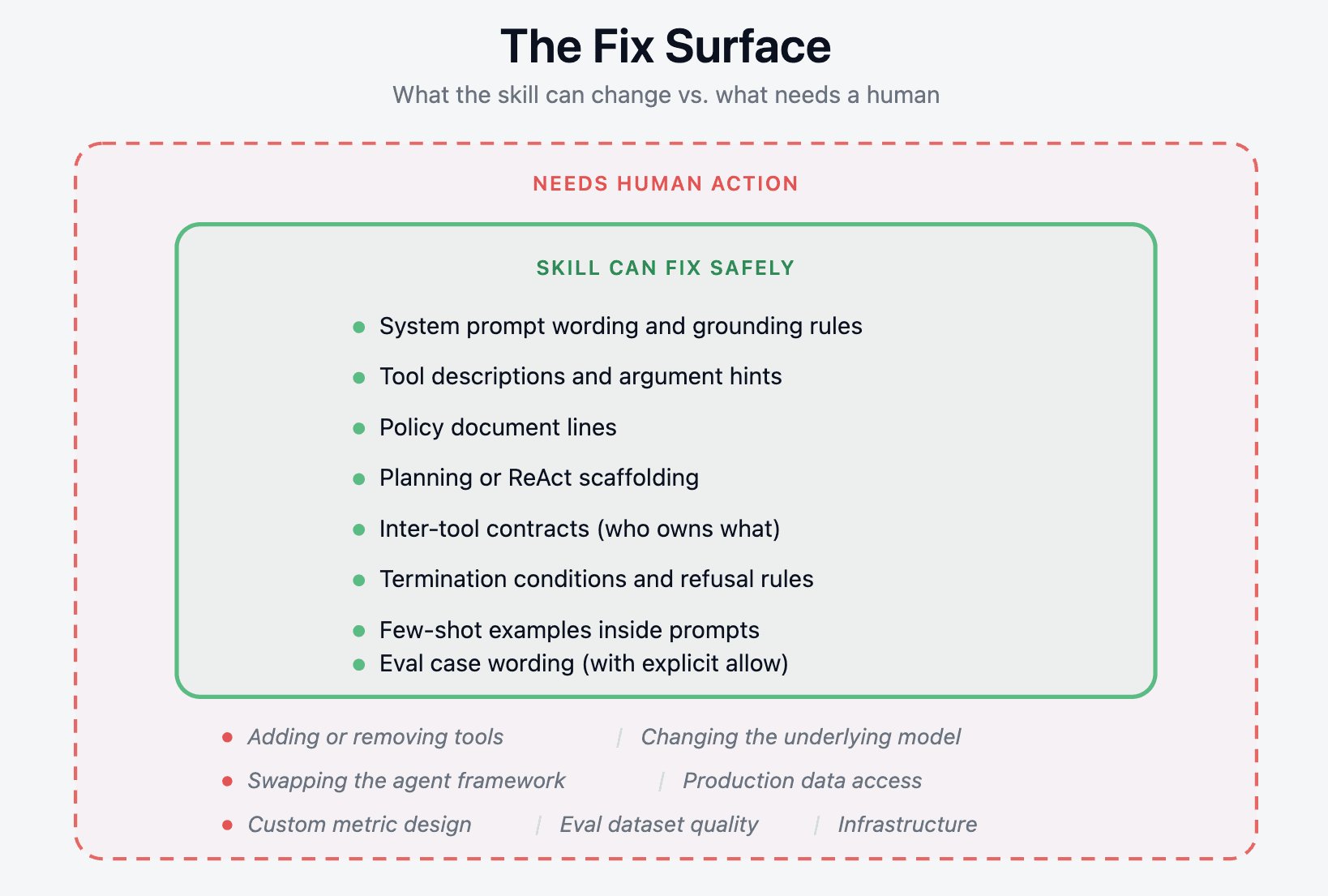
It is bounded by design. Eval Engineer starts from an explicit repo-local config: which files are editable, which commands verify changes, and which evidence is current. The skill is written to prefer small changes to prompts, tool descriptions, routing rules, retrieval settings, metric profiles, and eval cases. Bigger decisions, such as adding tools, changing models, swapping frameworks, or redefining product behavior, stay with the developer.
It turns the eval lifecycle into a development workflow. The Eval Engineering book frames evals as something teams create, tune, use in development, and eventually rely on in production. Eval Engineer is one way to make that lifecycle executable from the coding-agent session itself.
Using Eval Engineer by Persona
Eval Engineer works best when each team treats the skills as a shared workflow, then customizes the evidence, metrics, and allowed fix surfaces for their job.
AI Engineer
Use Eval Engineer inside the normal development loop. Start with eval-engineer as the router, then move to eval-diagnose or eval-cost depending on whether the problem is quality or efficiency. Customize by declaring the exact files the skill may touch: prompts, tool descriptions, retriever configs, routing rules, guardrail text, eval cases, or test harnesses. Add local verification commands so every suggested change can be checked before rerunning Galileo. For AI engineers, the value lies in disciplined iteration: change one thing, measure it, and keep it only if the evidence improves.
Researcher
Use Eval Engineer to compare behaviors across prompts, models, eval strategies, and judge designs. Start from controlled packets or experiments, then use eval-diagnose and eval-measure to understand whether a metric is actually capturing the intended behavior. Customize the workflow by adding research-specific metric notes, evaluator prompts, model comparison slices, and holdout cases. The goal is not only to improve one agent but to learn which evaluation design produces reliable signal.
FDE
Use Eval Engineer as a field debugging accelerator. Start from whatever artifact the customer has: a Galileo log-stream URL, a bad session, a trace, a metric drop, or an exported packet. Use eval-fetch to create a compact working set, then eval-diagnose to produce a grounded RCA and fix plan the customer can review. Customize by encoding customer-specific constraints in .galileo/config.yml: editable files, forbidden files, verification commands, deployment limits, and business-critical segments. For FDEs, the biggest win is turning messy customer evidence into a clear next action.
SRE
Use Eval Engineer for production RCA and regression response. Start with eval-fetch from log streams, sessions, time windows, or alert-linked traces. Use eval-diagnose to classify whether the issue stems from model behavior, tool failure, retrieval drift, latency, cost, scorer failure, or data quality. Customize with production thresholds, service-level metrics, rollback checks, canary commands, and "do not edit" boundaries. SRE usage should bias toward diagnosis, verification, and escalation clarity rather than automatic fixes.
What this is not
Eval Engineer is not a replacement for Galileo. Galileo remains the system of record for traces, metrics, log streams, experiments, and scored evidence. Eval Engineer is the repo-local workflow that helps a coding agent use that evidence.
It is not a magic self-improving agent. It can propose and verify bounded changes, but a human still owns the product decision, the merge decision, and any broad architecture change.
It is not tied to one agent framework. The skill works through files, commands, Galileo evidence, and expected-output contracts. That makes it usable across RAG apps, tool-calling agents, agentic workflows, and custom harnesses, as long as the repo can produce useful evidence.
It also does not make weak evals strong by itself. If the trace is missing, the metric is wrong for the use case, or the expected behavior is underspecified, the right move is to fix measurement first. That is why eval-measure exists.
How to Customize for your Usecases
The primary customization point is .galileo/config.yml. Use it to define:
what kind of app this is: RAG, agent, workflow, eval harness, or mixed system
where current evidence lives
which files the skill may edit
which files are off-limits
which local commands verify behavior
which Galileo metrics matter
which quality gates must not regress
which segments or risk profiles need separate review
Add reusable team knowledge in .galileo/learnings.md: known failure modes, metric caveats, customer constraints, and verification lessons. Keep these short and evidence-backed.
For deeper customization, add references under skills/eval-engineer/references/ or use focused command skills for different jobs. The rule is simple: keep the core skill general, and put use-case-specific knowledge in references, configs, and eval packets.
Learning from Building Skills
Loose coupling to the app, tight coupling to the workflow
The strongest skill design pattern is loose coupling to the user's app and tight coupling to the workflow. A skill should not assume one framework, one agent shape, one metric, or one folder layout. Instead, it should define the repeatable loop: what evidence to read, what decision to make, what artifact to write, and how to verify the result.
Keep domain knowledge out of the core
To generalize well, keep domain-specific details out of the core skill. The core skill should specify: read the current evidence packet, identify the metric contract, compare expected against actual behavior, classify the fix surface, propose a bounded change, and verify. Specific knowledge about Galileo metrics, tokenomics, RAG, URL parsing, or OWASP should live in focused references and sub-skills loaded only when needed.
Define clear input contracts
Good skills need clear input contracts. Eval Engineer became more reliable once it began consuming compact debug packets rather than raw traces. The packet gives the agent stable fields: source IDs, metrics, failing cases, expected behavior, actual behavior, trace/span links, and evidence notes. This structure lets the skill reason across agents, RAG apps, and production log streams without overfitting to any single implementation.
Expose job-shaped commands
Usability improves when the skill exposes job-shaped commands rather than implementation-shaped ones. Users think in tasks: setup, fetch evidence, measure correctly, diagnose, reduce cost, audit. Splitting the surface into eval-setup, eval-fetch, eval-measure, eval-diagnose, eval-cost, and eval-audit made the system easier to discover while keeping eval-engineer as the router and educator.
Be honest about boundaries
A reusable skill should also be honest about its boundaries. It should prefer small, reviewable changes and escalate the bigger decisions: changing models, adding tools, swapping frameworks, weakening safety rules, reindexing production data, or redefining product behavior. This keeps the skill useful without pretending to own product judgment.
Leave artifacts behind
Finally, every skill should leave artifacts. A good run produces a diagnosis, a fix plan, a verification plan, and before/after evidence. These files make the agent's reasoning inspectable, transferable, and testable. Without artifacts, the workflow stays trapped in chat; with them, the skill becomes part of the engineering system.
Get started
Eval Engineer alpha supports Galileo-backed RCA inside Claude Code and Codex. The best-supported path today is a repo with .galileo/current/ packets produced from Galileo log-stream evidence. Controlled experiments are still supported when the requested scored metrics are present, but experiment creation alone is not treated as proof.
The fastest path to try it:
cd your-agent-repo

uvx --from git+https://github.com/Galileo-Agent-Labs/eval-engineer.git \
  eval-engineer install --target both --scope project --project-dir
Then open Claude Code or Codex in the repo and start with the router:
/eval-engineer inspect this project and tell me the best next step.
In Codex, use:
$eval-engineer inspect this project and tell me the best next step.
If you already have production Galileo evidence, start from the log stream:
/eval-fetch https://app.galileo.ai/.../log-streams/...
/eval-diagnose .galileo/current/debug-packet.json
/eval-cost compare the baseline and verification packets
The command surface is intentionally small:
/eval-engineer  route me to the right next step
/eval-setup     inspect or prepare this repo
/eval-fetch     import Galileo evidence
/eval-measure   check whether metrics match the use case
/eval-diagnose  find root cause from evidence
/eval-cost      reduce spend without quality regression
/eval-audit     review safety, launch readiness
Try it on one production log stream: install the skills, fetch a compact packet, ask for a diagnosis, and see whether the fix plan is grounded enough to review. If the loop breaks for your case, tell us where. That failure is exactly the evidence the next version should be built on.
Build the loop today with https://github.com/Galileo-Agent-Labs/eval-engineer
Your production agent started routing billing disputes to general support last night. A Galileo log stream shows tool selection quality at 0.33 on the affected production slice, down from 0.80 the week before. You have a bad session open in one tab and the agent's system prompt in another.
The codebase knows how the app is built. Galileo knows how the app behaves. Eval expertise tells you which evidence matters, how to turn a failure into a reusable eval case, and where a fix belongs.
Most developers do not carry all three contexts at once. That is the gap Eval Engineer is trying to close.
Agent observability tells you what happened. Eval engineering tells you what to do next. Eval Engineer turns that workflow into executable skills inside the coding agent.
Eval Engineer is a skill bundle for Claude Code and OpenAI Codex that closes that gap. You point it at the Galileo evidence and ask it to diagnose. It produces three artifacts: a diagnosis, a bounded fix plan, and a verification plan with the exact commands needed to prove the fix worked.
It does not own the agent. It does not own the codebase.
It owns the small, repeatable workflow between "metric dropped" and "PR ready for review."
This post covers what Eval Engineer is and how to install it. We walk through what each command does and run one full production RCA loop from a Galileo log stream on a simple billing-support agent.
Try our alpha release today: https://github.com/Galileo-Agent-Labs/eval-engineer
Why Galileo evidence matters
Eval Engineer depends on Galileo because a useful fix loop needs more than a failing answer. It needs evidence at the level where the agent actually made the mistake.
The metrics tell you which behavior regressed. Traces and spans show where the behavior came from: model calls, tool calls, retrieval steps, rerankers, planners, self-checks, and handoffs. Scorer rationales explain why a case failed instead of only reporting that it failed. Log streams make the workflow usable for production RCA, where the starting point is usually a URL, a bad session, a time window, or a metric drop in live traffic.
Eval Engineer turns that evidence into a small working set in the repo. The coding agent does not need the whole dashboard pasted into chat. It needs the source IDs, failing cases, metric movement, expected behavior, actual behavior, and enough trace context to propose a bounded change and verify it against the same contract.
That matches the workflow in Galileo's Eval Engineering book: start with observed behavior, tune the eval against expert judgment, and keep difficult cases as reusable evidence. The book puts it plainly: "An eval is only as good as its tuning." Eval Engineer brings that discipline into the repo, where the fix is being made.
Installation
Eval Engineer is open source and ships as a small Python installer plus a set of repo-local skill files. The install does not require Galileo credentials and does not require you to set a Galileo project. Credentials are only needed later when a skill run fetches or writes Galileo evidence.
# From the agent repo you want to debug or improve
# From the agent repo you want to debug or improve
cd your-agent-repo

uvx --from git+https://github.com/Galileo-Agent-Labs/eval-engineer.git \
  eval-engineer install --target both --scope project --project-dir
The installer writes the command skills into .claude/skills/eval-* for Claude Code and .agents/skills/eval-* for Codex. It also prepares a minimal .galileo/ working set without overwriting existing files. After installing, open or restart Claude Code or Codex from the same project folder so the host agent can discover the project skills.
By the end of the install, you have a repo that looks like this:
your-agent-repo/
  .galileo/
    config.yml
    current/                  # active evidence and skill output
    sessions/                 # append-only history
    eval-dataset/
    learnings.md
  .claude/skills/eval-*       # Claude Code command skills
  .agents/skills/eval-*       # Codex command skills
Edit .galileo/config.yml to tell the skills which files they are allowed to edit, which verification commands to run, and where current evidence lives. You do not need to hardcode a Galileo project into the repo just to install the skills.
Skills and what each one does
Eval Engineer is split into a routing front door plus a small set of specialists. They are installed as skills and also exposed as commands: slash commands in Claude Code and $ command-style mentions in Codex.
Skill / command | Use it when |
eval-engineer | You are not sure which step is next. The front door inspects the working set and routes. |
eval-setup | The repo needs a .galileo/ working set, config, editable files, or verification commands. |
eval-fetch | You have a Galileo log-stream URL, production session, trace ID, time window, or exported packet, and need compact evidence pulled into .galileo/current/. |
eval-measure | The score looks off, but you are not sure whether the metric or the eval case is the problem. |
eval-diagnose | A debug packet is ready, and you want a root cause plus a bounded fix plan. |
eval-cost | You want to reduce tokens, latency, tool calls, retrieval, model, or evaluator spend without regressing quality. |
eval-audit | You need a launch-readiness, safety, metric coverage, or production-readiness review. |
You can invoke the front door naturally, or call a focused command directly. In Claude Code, use /eval-diagnose. In Codex, use $eval-diagnose. The command reads .galileo/current/ and writes its artifacts back into the same place.
The same loop applies beyond tool routing. For RAG systems, eval-measure can check whether the metric profile covers groundedness, retrieval quality, answer completeness, citation behavior, and abstention. For cost work, eval-cost compares token, latency, model, retrieval, rerank, tool-call, retry, and evaluator movement against the quality metrics that must not regress. For launch readiness, eval-audit can review metric coverage, traceability, safety, and agentic AI risks.
Lets fix an agent with Eval Engineer
Here is one full loop on a small billing-support agent from a production Galileo log stream. The point is not the specific app. The point is the operating model: bring production evidence into the repo, diagnose from traces and metrics, make one bounded change, and verify the same contract on a fresh production or canary slice.
The setup. The agent has four tools. escalate_to_billing covers charges, refunds, and billing disputes. escalate_to_support covers product issues, login problems, and general help. lookup_invoice reads invoice records. send_invoice_copy emails a customer a copy of an invoice.
A production customer sends this message:
The expected behavior is one tool call: escalate_to_billing(reason="incorrect_charge").
What actually happened. The agent called escalate_to_support(reason="billing_question"). In the Galileo log stream for the last six hours of production traffic, billing-dispute cases are clustered among the lowest tool_selection_quality traces. The dashboard flags the regression, and you open Claude Code in the agent's repo.
Step 1: Let the router inspect the repo. You open Claude Code in the agent repo and ask:
/eval-engineer inspect this project and tell me the best next step.
In Codex, the same action is:
$eval-engineer inspect this project and tell me the best next step.
Eval Engineer checks .galileo/config.yml, .galileo/current/, and the configured verification commands. In this example, there is no current debug packet yet, so the router points you to /eval-fetch.
Step 2: Bring in Galileo evidence. You start from the production artifact you already have: a log-stream URL, a bad session, a trace ID, or a time-bounded metric slice. For a Galileo log stream, the command looks like:
/eval-fetch https://app.galileo.ai/.../log-streams/<log-stream-id>
If the URL is too broad, /eval-fetch asks for the missing production slice: time window, latest-N traces, failed traces, specific session, target metric, or comparison window. The result is a compact packet in .galileo/current/debug-packet.json. The packet is tens of kilobytes, not a raw trace dump. It carries the Galileo log-stream ID, failing production cases, expected versus actual behavior, scores, trace/span IDs, and enough context for a coding agent to reason without loading the whole dashboard into chat.
Step 3: Diagnose. With evidence in place, you run:
/eval-diagnose diagnose the current debug packet.
eval-diagnose writes three artifacts. Here is what .galileo/current/diagnosis.md looks like in this example:
# Diagnosis: support-agent production log stream, 2026-05-12T12:00Z-18:00Z

## Failing metric
- tool_selection_quality = 0.33 (target ≥ 0.80)
- Failing production slice: billing-dispute sessions

## Root cause
The agent called escalate_to_support when the expected
behavior was escalate_to_billing. The user's message is
unambiguously a billing matter (a disputed charge). The
scorer rationale on the LLM span confirms the routing
was wrong.

## Scorer rationale
"Billing dispute should route to escalate_to_billing per
the tool's stated purpose. The selected tool,
escalate_to_support, covers product, login, and general
help, not money issues."

## Evidence
- Trace: 84881432-c569-4018-9802-57538f2c3375
- LLM span: 15f19421-d39d-4120-9c14-fef9092059a3
- Log stream: billing-support-prod
- Session: customer-billing-dispute-20260512-1432
- Packet: .galileo/current/debug-packet.json
The skill follows up with fix-plan.md:
# Fix Plan

## Change 1: tools/descriptions.yml
Tighten the escalate_to_support description so it cannot
swallow billing cases.

Before:
"Use for product issues, login problems, general help, or
any case where the customer needs assistance."

After:
"Use for product issues, login problems, or general help.
Do NOT use for charges, refunds, or billing disputes;
those route to escalate_to_billing."

## Change 2: prompts/system.md
Append one routing rule at the end of the escalation
section:
"When in doubt between billing and support: money issues
go to billing."

## Edit scope
- tools/descriptions.yml (in editable_files)
- prompts/system.md (in editable_files)
And verification-plan.md:
# Verification Plan

## Local check
python -m pytest tests/agent/test_routing.py::test_billing_disputes

## Galileo check
Run the project's configured verification command from .galileo/config.yml.
For this repo, that command sends a small canary slice through the same
production log stream and writes:
  .galileo/current/verification-debug-packet.json

Compare against .galileo/current/debug-packet.json:
- tool_selection_quality:        0.33 -> expect >= 0.80
- agentic_workflow_success:      0.50 -> expect >= 0.75
- Watch for regression on non-billing cases

## Dataset action
This is a clean billing-vs-support routing failure.
Propose as candidate eval case in:
  .galileo/eval-dataset/candidates.jsonl
Status: candidate (human review required)
Step 4: Apply and verify. You read the diagnosis and the fix plan, decide both changes are reasonable, and tell Claude:
The coding agent edits tools/descriptions.yml and prompts/system.md within the bounds declared in .galileo/config.yml. It does not touch application code, the agent framework, or the model. You run the local check and the Galileo verification command that your repo already defines. In this example, the verification command logs a fresh canary slice into Galileo and exports a new compact packet. Eval Engineer does not require a special galileo-eval run command or a hardcoded Galileo project setting to do this.
When the verification packet lands, eval-engineer compares baseline and after-change evidence:
Verification result:
- tool_selection_quality:   0.33 -> 0.83
- agentic_workflow_success: 0.50 -> 0.81
- No regression on adjacent case categories
- Candidate eval case proposed (awaiting human accept)
You ship the PR. The entire loop, from "metric dropped overnight" to "verified fix in review," ran through your normal coding-agent chat without you leaving the editor.
The concrete artifacts are the important part. A useful run should leave behind:
Those files make the agent's reasoning auditable. A reviewer can see the original evidence, the claimed root cause, the proposed edit scope, and the before/after packet used to decide whether the change was worth keeping.
This is also where subject-matter expertise stays in the loop. A production failure can become a candidate eval case, but it should not silently become permanent ground truth. The human review step mirrors the Eval Engineering book's SME annotation loop: experts validate the examples and labels that future automation will rely on.
Why this is worth your time
There are three reasons we think this loop is worth adopting now.
It lives where developers already work. The skill runs inside Claude Code and Codex through their normal skills systems, with no extra dashboard to learn. The coding agent reads, edits, and reruns; the skill handles the framing.
It produces verifiable artifacts. Every diagnosis cites the trace and span IDs. Every fix plan cites the files it edited, and every verification plan cites the exact commands and metrics to check. If a teammate inherits the session, the artifacts tell them everything they need.
It is bounded by design. Eval Engineer starts from an explicit repo-local config: which files are editable, which commands verify changes, and which evidence is current. The skill is written to prefer small changes to prompts, tool descriptions, routing rules, retrieval settings, metric profiles, and eval cases. Bigger decisions, such as adding tools, changing models, swapping frameworks, or redefining product behavior, stay with the developer.
It turns the eval lifecycle into a development workflow. The Eval Engineering book frames evals as something teams create, tune, use in development, and eventually rely on in production. Eval Engineer is one way to make that lifecycle executable from the coding-agent session itself.
Using Eval Engineer by Persona
Eval Engineer works best when each team treats the skills as a shared workflow, then customizes the evidence, metrics, and allowed fix surfaces for their job.
AI Engineer
Use Eval Engineer inside the normal development loop. Start with eval-engineer as the router, then move to eval-diagnose or eval-cost depending on whether the problem is quality or efficiency. Customize by declaring the exact files the skill may touch: prompts, tool descriptions, retriever configs, routing rules, guardrail text, eval cases, or test harnesses. Add local verification commands so every suggested change can be checked before rerunning Galileo. For AI engineers, the value lies in disciplined iteration: change one thing, measure it, and keep it only if the evidence improves.
Researcher
Use Eval Engineer to compare behaviors across prompts, models, eval strategies, and judge designs. Start from controlled packets or experiments, then use eval-diagnose and eval-measure to understand whether a metric is actually capturing the intended behavior. Customize the workflow by adding research-specific metric notes, evaluator prompts, model comparison slices, and holdout cases. The goal is not only to improve one agent but to learn which evaluation design produces reliable signal.
FDE
Use Eval Engineer as a field debugging accelerator. Start from whatever artifact the customer has: a Galileo log-stream URL, a bad session, a trace, a metric drop, or an exported packet. Use eval-fetch to create a compact working set, then eval-diagnose to produce a grounded RCA and fix plan the customer can review. Customize by encoding customer-specific constraints in .galileo/config.yml: editable files, forbidden files, verification commands, deployment limits, and business-critical segments. For FDEs, the biggest win is turning messy customer evidence into a clear next action.
SRE
Use Eval Engineer for production RCA and regression response. Start with eval-fetch from log streams, sessions, time windows, or alert-linked traces. Use eval-diagnose to classify whether the issue stems from model behavior, tool failure, retrieval drift, latency, cost, scorer failure, or data quality. Customize with production thresholds, service-level metrics, rollback checks, canary commands, and "do not edit" boundaries. SRE usage should bias toward diagnosis, verification, and escalation clarity rather than automatic fixes.
What this is not
Eval Engineer is not a replacement for Galileo. Galileo remains the system of record for traces, metrics, log streams, experiments, and scored evidence. Eval Engineer is the repo-local workflow that helps a coding agent use that evidence.
It is not a magic self-improving agent. It can propose and verify bounded changes, but a human still owns the product decision, the merge decision, and any broad architecture change.
It is not tied to one agent framework. The skill works through files, commands, Galileo evidence, and expected-output contracts. That makes it usable across RAG apps, tool-calling agents, agentic workflows, and custom harnesses, as long as the repo can produce useful evidence.
It also does not make weak evals strong by itself. If the trace is missing, the metric is wrong for the use case, or the expected behavior is underspecified, the right move is to fix measurement first. That is why eval-measure exists.
How to Customize for your Usecases
The primary customization point is .galileo/config.yml. Use it to define:
what kind of app this is: RAG, agent, workflow, eval harness, or mixed system
where current evidence lives
which files the skill may edit
which files are off-limits
which local commands verify behavior
which Galileo metrics matter
which quality gates must not regress
which segments or risk profiles need separate review
Add reusable team knowledge in .galileo/learnings.md: known failure modes, metric caveats, customer constraints, and verification lessons. Keep these short and evidence-backed.
For deeper customization, add references under skills/eval-engineer/references/ or use focused command skills for different jobs. The rule is simple: keep the core skill general, and put use-case-specific knowledge in references, configs, and eval packets.
Learning from Building Skills
Loose coupling to the app, tight coupling to the workflow
The strongest skill design pattern is loose coupling to the user's app and tight coupling to the workflow. A skill should not assume one framework, one agent shape, one metric, or one folder layout. Instead, it should define the repeatable loop: what evidence to read, what decision to make, what artifact to write, and how to verify the result.
Keep domain knowledge out of the core
To generalize well, keep domain-specific details out of the core skill. The core skill should specify: read the current evidence packet, identify the metric contract, compare expected against actual behavior, classify the fix surface, propose a bounded change, and verify. Specific knowledge about Galileo metrics, tokenomics, RAG, URL parsing, or OWASP should live in focused references and sub-skills loaded only when needed.
Define clear input contracts
Good skills need clear input contracts. Eval Engineer became more reliable once it began consuming compact debug packets rather than raw traces. The packet gives the agent stable fields: source IDs, metrics, failing cases, expected behavior, actual behavior, trace/span links, and evidence notes. This structure lets the skill reason across agents, RAG apps, and production log streams without overfitting to any single implementation.
Expose job-shaped commands
Usability improves when the skill exposes job-shaped commands rather than implementation-shaped ones. Users think in tasks: setup, fetch evidence, measure correctly, diagnose, reduce cost, audit. Splitting the surface into eval-setup, eval-fetch, eval-measure, eval-diagnose, eval-cost, and eval-audit made the system easier to discover while keeping eval-engineer as the router and educator.
Be honest about boundaries
A reusable skill should also be honest about its boundaries. It should prefer small, reviewable changes and escalate the bigger decisions: changing models, adding tools, swapping frameworks, weakening safety rules, reindexing production data, or redefining product behavior. This keeps the skill useful without pretending to own product judgment.
Leave artifacts behind
Finally, every skill should leave artifacts. A good run produces a diagnosis, a fix plan, a verification plan, and before/after evidence. These files make the agent's reasoning inspectable, transferable, and testable. Without artifacts, the workflow stays trapped in chat; with them, the skill becomes part of the engineering system.
Get started
Eval Engineer alpha supports Galileo-backed RCA inside Claude Code and Codex. The best-supported path today is a repo with .galileo/current/ packets produced from Galileo log-stream evidence. Controlled experiments are still supported when the requested scored metrics are present, but experiment creation alone is not treated as proof.
The fastest path to try it:
cd your-agent-repo

uvx --from git+https://github.com/Galileo-Agent-Labs/eval-engineer.git \
  eval-engineer install --target both --scope project --project-dir
Then open Claude Code or Codex in the repo and start with the router:
/eval-engineer inspect this project and tell me the best next step.
In Codex, use:
$eval-engineer inspect this project and tell me the best next step.
If you already have production Galileo evidence, start from the log stream:
/eval-fetch https://app.galileo.ai/.../log-streams/...
/eval-diagnose .galileo/current/debug-packet.json
/eval-cost compare the baseline and verification packets
The command surface is intentionally small:
/eval-engineer  route me to the right next step
/eval-setup     inspect or prepare this repo
/eval-fetch     import Galileo evidence
/eval-measure   check whether metrics match the use case
/eval-diagnose  find root cause from evidence
/eval-cost      reduce spend without quality regression
/eval-audit     review safety, launch readiness
Try it on one production log stream: install the skills, fetch a compact packet, ask for a diagnosis, and see whether the fix plan is grounded enough to review. If the loop breaks for your case, tell us where. That failure is exactly the evidence the next version should be built on.
Build the loop today with https://github.com/Galileo-Agent-Labs/eval-engineer
Your production agent started routing billing disputes to general support last night. A Galileo log stream shows tool selection quality at 0.33 on the affected production slice, down from 0.80 the week before. You have a bad session open in one tab and the agent's system prompt in another.
The codebase knows how the app is built. Galileo knows how the app behaves. Eval expertise tells you which evidence matters, how to turn a failure into a reusable eval case, and where a fix belongs.
Most developers do not carry all three contexts at once. That is the gap Eval Engineer is trying to close.
Agent observability tells you what happened. Eval engineering tells you what to do next. Eval Engineer turns that workflow into executable skills inside the coding agent.
Eval Engineer is a skill bundle for Claude Code and OpenAI Codex that closes that gap. You point it at the Galileo evidence and ask it to diagnose. It produces three artifacts: a diagnosis, a bounded fix plan, and a verification plan with the exact commands needed to prove the fix worked.
It does not own the agent. It does not own the codebase.
It owns the small, repeatable workflow between "metric dropped" and "PR ready for review."
This post covers what Eval Engineer is and how to install it. We walk through what each command does and run one full production RCA loop from a Galileo log stream on a simple billing-support agent.
Try our alpha release today: https://github.com/Galileo-Agent-Labs/eval-engineer
Why Galileo evidence matters
Eval Engineer depends on Galileo because a useful fix loop needs more than a failing answer. It needs evidence at the level where the agent actually made the mistake.
The metrics tell you which behavior regressed. Traces and spans show where the behavior came from: model calls, tool calls, retrieval steps, rerankers, planners, self-checks, and handoffs. Scorer rationales explain why a case failed instead of only reporting that it failed. Log streams make the workflow usable for production RCA, where the starting point is usually a URL, a bad session, a time window, or a metric drop in live traffic.
Eval Engineer turns that evidence into a small working set in the repo. The coding agent does not need the whole dashboard pasted into chat. It needs the source IDs, failing cases, metric movement, expected behavior, actual behavior, and enough trace context to propose a bounded change and verify it against the same contract.
That matches the workflow in Galileo's Eval Engineering book: start with observed behavior, tune the eval against expert judgment, and keep difficult cases as reusable evidence. The book puts it plainly: "An eval is only as good as its tuning." Eval Engineer brings that discipline into the repo, where the fix is being made.
Installation
Eval Engineer is open source and ships as a small Python installer plus a set of repo-local skill files. The install does not require Galileo credentials and does not require you to set a Galileo project. Credentials are only needed later when a skill run fetches or writes Galileo evidence.
# From the agent repo you want to debug or improve
# From the agent repo you want to debug or improve
cd your-agent-repo

uvx --from git+https://github.com/Galileo-Agent-Labs/eval-engineer.git \
  eval-engineer install --target both --scope project --project-dir
The installer writes the command skills into .claude/skills/eval-* for Claude Code and .agents/skills/eval-* for Codex. It also prepares a minimal .galileo/ working set without overwriting existing files. After installing, open or restart Claude Code or Codex from the same project folder so the host agent can discover the project skills.
By the end of the install, you have a repo that looks like this:
your-agent-repo/
  .galileo/
    config.yml
    current/                  # active evidence and skill output
    sessions/                 # append-only history
    eval-dataset/
    learnings.md
  .claude/skills/eval-*       # Claude Code command skills
  .agents/skills/eval-*       # Codex command skills
Edit .galileo/config.yml to tell the skills which files they are allowed to edit, which verification commands to run, and where current evidence lives. You do not need to hardcode a Galileo project into the repo just to install the skills.
Skills and what each one does
Eval Engineer is split into a routing front door plus a small set of specialists. They are installed as skills and also exposed as commands: slash commands in Claude Code and $ command-style mentions in Codex.
Skill / command | Use it when |
eval-engineer | You are not sure which step is next. The front door inspects the working set and routes. |
eval-setup | The repo needs a .galileo/ working set, config, editable files, or verification commands. |
eval-fetch | You have a Galileo log-stream URL, production session, trace ID, time window, or exported packet, and need compact evidence pulled into .galileo/current/. |
eval-measure | The score looks off, but you are not sure whether the metric or the eval case is the problem. |
eval-diagnose | A debug packet is ready, and you want a root cause plus a bounded fix plan. |
eval-cost | You want to reduce tokens, latency, tool calls, retrieval, model, or evaluator spend without regressing quality. |
eval-audit | You need a launch-readiness, safety, metric coverage, or production-readiness review. |
You can invoke the front door naturally, or call a focused command directly. In Claude Code, use /eval-diagnose. In Codex, use $eval-diagnose. The command reads .galileo/current/ and writes its artifacts back into the same place.
The same loop applies beyond tool routing. For RAG systems, eval-measure can check whether the metric profile covers groundedness, retrieval quality, answer completeness, citation behavior, and abstention. For cost work, eval-cost compares token, latency, model, retrieval, rerank, tool-call, retry, and evaluator movement against the quality metrics that must not regress. For launch readiness, eval-audit can review metric coverage, traceability, safety, and agentic AI risks.
Lets fix an agent with Eval Engineer
Here is one full loop on a small billing-support agent from a production Galileo log stream. The point is not the specific app. The point is the operating model: bring production evidence into the repo, diagnose from traces and metrics, make one bounded change, and verify the same contract on a fresh production or canary slice.
The setup. The agent has four tools. escalate_to_billing covers charges, refunds, and billing disputes. escalate_to_support covers product issues, login problems, and general help. lookup_invoice reads invoice records. send_invoice_copy emails a customer a copy of an invoice.
A production customer sends this message:
The expected behavior is one tool call: escalate_to_billing(reason="incorrect_charge").
What actually happened. The agent called escalate_to_support(reason="billing_question"). In the Galileo log stream for the last six hours of production traffic, billing-dispute cases are clustered among the lowest tool_selection_quality traces. The dashboard flags the regression, and you open Claude Code in the agent's repo.
Step 1: Let the router inspect the repo. You open Claude Code in the agent repo and ask:
/eval-engineer inspect this project and tell me the best next step.
In Codex, the same action is:
$eval-engineer inspect this project and tell me the best next step.
Eval Engineer checks .galileo/config.yml, .galileo/current/, and the configured verification commands. In this example, there is no current debug packet yet, so the router points you to /eval-fetch.
Step 2: Bring in Galileo evidence. You start from the production artifact you already have: a log-stream URL, a bad session, a trace ID, or a time-bounded metric slice. For a Galileo log stream, the command looks like:
/eval-fetch https://app.galileo.ai/.../log-streams/<log-stream-id>
If the URL is too broad, /eval-fetch asks for the missing production slice: time window, latest-N traces, failed traces, specific session, target metric, or comparison window. The result is a compact packet in .galileo/current/debug-packet.json. The packet is tens of kilobytes, not a raw trace dump. It carries the Galileo log-stream ID, failing production cases, expected versus actual behavior, scores, trace/span IDs, and enough context for a coding agent to reason without loading the whole dashboard into chat.
Step 3: Diagnose. With evidence in place, you run:
/eval-diagnose diagnose the current debug packet.
eval-diagnose writes three artifacts. Here is what .galileo/current/diagnosis.md looks like in this example:
# Diagnosis: support-agent production log stream, 2026-05-12T12:00Z-18:00Z

## Failing metric
- tool_selection_quality = 0.33 (target ≥ 0.80)
- Failing production slice: billing-dispute sessions

## Root cause
The agent called escalate_to_support when the expected
behavior was escalate_to_billing. The user's message is
unambiguously a billing matter (a disputed charge). The
scorer rationale on the LLM span confirms the routing
was wrong.

## Scorer rationale
"Billing dispute should route to escalate_to_billing per
the tool's stated purpose. The selected tool,
escalate_to_support, covers product, login, and general
help, not money issues."

## Evidence
- Trace: 84881432-c569-4018-9802-57538f2c3375
- LLM span: 15f19421-d39d-4120-9c14-fef9092059a3
- Log stream: billing-support-prod
- Session: customer-billing-dispute-20260512-1432
- Packet: .galileo/current/debug-packet.json
The skill follows up with fix-plan.md:
# Fix Plan

## Change 1: tools/descriptions.yml
Tighten the escalate_to_support description so it cannot
swallow billing cases.

Before:
"Use for product issues, login problems, general help, or
any case where the customer needs assistance."

After:
"Use for product issues, login problems, or general help.
Do NOT use for charges, refunds, or billing disputes;
those route to escalate_to_billing."

## Change 2: prompts/system.md
Append one routing rule at the end of the escalation
section:
"When in doubt between billing and support: money issues
go to billing."

## Edit scope
- tools/descriptions.yml (in editable_files)
- prompts/system.md (in editable_files)
And verification-plan.md:
# Verification Plan

## Local check
python -m pytest tests/agent/test_routing.py::test_billing_disputes

## Galileo check
Run the project's configured verification command from .galileo/config.yml.
For this repo, that command sends a small canary slice through the same
production log stream and writes:
  .galileo/current/verification-debug-packet.json

Compare against .galileo/current/debug-packet.json:
- tool_selection_quality:        0.33 -> expect >= 0.80
- agentic_workflow_success:      0.50 -> expect >= 0.75
- Watch for regression on non-billing cases

## Dataset action
This is a clean billing-vs-support routing failure.
Propose as candidate eval case in:
  .galileo/eval-dataset/candidates.jsonl
Status: candidate (human review required)
Step 4: Apply and verify. You read the diagnosis and the fix plan, decide both changes are reasonable, and tell Claude:
The coding agent edits tools/descriptions.yml and prompts/system.md within the bounds declared in .galileo/config.yml. It does not touch application code, the agent framework, or the model. You run the local check and the Galileo verification command that your repo already defines. In this example, the verification command logs a fresh canary slice into Galileo and exports a new compact packet. Eval Engineer does not require a special galileo-eval run command or a hardcoded Galileo project setting to do this.
When the verification packet lands, eval-engineer compares baseline and after-change evidence:
Verification result:
- tool_selection_quality:   0.33 -> 0.83
- agentic_workflow_success: 0.50 -> 0.81
- No regression on adjacent case categories
- Candidate eval case proposed (awaiting human accept)
You ship the PR. The entire loop, from "metric dropped overnight" to "verified fix in review," ran through your normal coding-agent chat without you leaving the editor.
The concrete artifacts are the important part. A useful run should leave behind:
Those files make the agent's reasoning auditable. A reviewer can see the original evidence, the claimed root cause, the proposed edit scope, and the before/after packet used to decide whether the change was worth keeping.
This is also where subject-matter expertise stays in the loop. A production failure can become a candidate eval case, but it should not silently become permanent ground truth. The human review step mirrors the Eval Engineering book's SME annotation loop: experts validate the examples and labels that future automation will rely on.
Why this is worth your time
There are three reasons we think this loop is worth adopting now.
It lives where developers already work. The skill runs inside Claude Code and Codex through their normal skills systems, with no extra dashboard to learn. The coding agent reads, edits, and reruns; the skill handles the framing.
It produces verifiable artifacts. Every diagnosis cites the trace and span IDs. Every fix plan cites the files it edited, and every verification plan cites the exact commands and metrics to check. If a teammate inherits the session, the artifacts tell them everything they need.
It is bounded by design. Eval Engineer starts from an explicit repo-local config: which files are editable, which commands verify changes, and which evidence is current. The skill is written to prefer small changes to prompts, tool descriptions, routing rules, retrieval settings, metric profiles, and eval cases. Bigger decisions, such as adding tools, changing models, swapping frameworks, or redefining product behavior, stay with the developer.
It turns the eval lifecycle into a development workflow. The Eval Engineering book frames evals as something teams create, tune, use in development, and eventually rely on in production. Eval Engineer is one way to make that lifecycle executable from the coding-agent session itself.
Using Eval Engineer by Persona
Eval Engineer works best when each team treats the skills as a shared workflow, then customizes the evidence, metrics, and allowed fix surfaces for their job.
AI Engineer
Use Eval Engineer inside the normal development loop. Start with eval-engineer as the router, then move to eval-diagnose or eval-cost depending on whether the problem is quality or efficiency. Customize by declaring the exact files the skill may touch: prompts, tool descriptions, retriever configs, routing rules, guardrail text, eval cases, or test harnesses. Add local verification commands so every suggested change can be checked before rerunning Galileo. For AI engineers, the value lies in disciplined iteration: change one thing, measure it, and keep it only if the evidence improves.
Researcher
Use Eval Engineer to compare behaviors across prompts, models, eval strategies, and judge designs. Start from controlled packets or experiments, then use eval-diagnose and eval-measure to understand whether a metric is actually capturing the intended behavior. Customize the workflow by adding research-specific metric notes, evaluator prompts, model comparison slices, and holdout cases. The goal is not only to improve one agent but to learn which evaluation design produces reliable signal.
FDE
Use Eval Engineer as a field debugging accelerator. Start from whatever artifact the customer has: a Galileo log-stream URL, a bad session, a trace, a metric drop, or an exported packet. Use eval-fetch to create a compact working set, then eval-diagnose to produce a grounded RCA and fix plan the customer can review. Customize by encoding customer-specific constraints in .galileo/config.yml: editable files, forbidden files, verification commands, deployment limits, and business-critical segments. For FDEs, the biggest win is turning messy customer evidence into a clear next action.
SRE
Use Eval Engineer for production RCA and regression response. Start with eval-fetch from log streams, sessions, time windows, or alert-linked traces. Use eval-diagnose to classify whether the issue stems from model behavior, tool failure, retrieval drift, latency, cost, scorer failure, or data quality. Customize with production thresholds, service-level metrics, rollback checks, canary commands, and "do not edit" boundaries. SRE usage should bias toward diagnosis, verification, and escalation clarity rather than automatic fixes.
What this is not
Eval Engineer is not a replacement for Galileo. Galileo remains the system of record for traces, metrics, log streams, experiments, and scored evidence. Eval Engineer is the repo-local workflow that helps a coding agent use that evidence.
It is not a magic self-improving agent. It can propose and verify bounded changes, but a human still owns the product decision, the merge decision, and any broad architecture change.
It is not tied to one agent framework. The skill works through files, commands, Galileo evidence, and expected-output contracts. That makes it usable across RAG apps, tool-calling agents, agentic workflows, and custom harnesses, as long as the repo can produce useful evidence.
It also does not make weak evals strong by itself. If the trace is missing, the metric is wrong for the use case, or the expected behavior is underspecified, the right move is to fix measurement first. That is why eval-measure exists.
How to Customize for your Usecases
The primary customization point is .galileo/config.yml. Use it to define:
what kind of app this is: RAG, agent, workflow, eval harness, or mixed system
where current evidence lives
which files the skill may edit
which files are off-limits
which local commands verify behavior
which Galileo metrics matter
which quality gates must not regress
which segments or risk profiles need separate review
Add reusable team knowledge in .galileo/learnings.md: known failure modes, metric caveats, customer constraints, and verification lessons. Keep these short and evidence-backed.
For deeper customization, add references under skills/eval-engineer/references/ or use focused command skills for different jobs. The rule is simple: keep the core skill general, and put use-case-specific knowledge in references, configs, and eval packets.
Learning from Building Skills
Loose coupling to the app, tight coupling to the workflow
The strongest skill design pattern is loose coupling to the user's app and tight coupling to the workflow. A skill should not assume one framework, one agent shape, one metric, or one folder layout. Instead, it should define the repeatable loop: what evidence to read, what decision to make, what artifact to write, and how to verify the result.
Keep domain knowledge out of the core
To generalize well, keep domain-specific details out of the core skill. The core skill should specify: read the current evidence packet, identify the metric contract, compare expected against actual behavior, classify the fix surface, propose a bounded change, and verify. Specific knowledge about Galileo metrics, tokenomics, RAG, URL parsing, or OWASP should live in focused references and sub-skills loaded only when needed.
Define clear input contracts
Good skills need clear input contracts. Eval Engineer became more reliable once it began consuming compact debug packets rather than raw traces. The packet gives the agent stable fields: source IDs, metrics, failing cases, expected behavior, actual behavior, trace/span links, and evidence notes. This structure lets the skill reason across agents, RAG apps, and production log streams without overfitting to any single implementation.
Expose job-shaped commands
Usability improves when the skill exposes job-shaped commands rather than implementation-shaped ones. Users think in tasks: setup, fetch evidence, measure correctly, diagnose, reduce cost, audit. Splitting the surface into eval-setup, eval-fetch, eval-measure, eval-diagnose, eval-cost, and eval-audit made the system easier to discover while keeping eval-engineer as the router and educator.
Be honest about boundaries
A reusable skill should also be honest about its boundaries. It should prefer small, reviewable changes and escalate the bigger decisions: changing models, adding tools, swapping frameworks, weakening safety rules, reindexing production data, or redefining product behavior. This keeps the skill useful without pretending to own product judgment.
Leave artifacts behind
Finally, every skill should leave artifacts. A good run produces a diagnosis, a fix plan, a verification plan, and before/after evidence. These files make the agent's reasoning inspectable, transferable, and testable. Without artifacts, the workflow stays trapped in chat; with them, the skill becomes part of the engineering system.
Get started
Eval Engineer alpha supports Galileo-backed RCA inside Claude Code and Codex. The best-supported path today is a repo with .galileo/current/ packets produced from Galileo log-stream evidence. Controlled experiments are still supported when the requested scored metrics are present, but experiment creation alone is not treated as proof.
The fastest path to try it:
cd your-agent-repo

uvx --from git+https://github.com/Galileo-Agent-Labs/eval-engineer.git \
  eval-engineer install --target both --scope project --project-dir
Then open Claude Code or Codex in the repo and start with the router:
/eval-engineer inspect this project and tell me the best next step.
In Codex, use:
$eval-engineer inspect this project and tell me the best next step.
If you already have production Galileo evidence, start from the log stream:
/eval-fetch https://app.galileo.ai/.../log-streams/...
/eval-diagnose .galileo/current/debug-packet.json
/eval-cost compare the baseline and verification packets
The command surface is intentionally small:
/eval-engineer  route me to the right next step
/eval-setup     inspect or prepare this repo
/eval-fetch     import Galileo evidence
/eval-measure   check whether metrics match the use case
/eval-diagnose  find root cause from evidence
/eval-cost      reduce spend without quality regression
/eval-audit     review safety, launch readiness
Try it on one production log stream: install the skills, fetch a compact packet, ask for a diagnosis, and see whether the fix plan is grounded enough to review. If the loop breaks for your case, tell us where. That failure is exactly the evidence the next version should be built on.
Build the loop today with https://github.com/Galileo-Agent-Labs/eval-engineer
Your production agent started routing billing disputes to general support last night. A Galileo log stream shows tool selection quality at 0.33 on the affected production slice, down from 0.80 the week before. You have a bad session open in one tab and the agent's system prompt in another.
The codebase knows how the app is built. Galileo knows how the app behaves. Eval expertise tells you which evidence matters, how to turn a failure into a reusable eval case, and where a fix belongs.
Most developers do not carry all three contexts at once. That is the gap Eval Engineer is trying to close.
Agent observability tells you what happened. Eval engineering tells you what to do next. Eval Engineer turns that workflow into executable skills inside the coding agent.
Eval Engineer is a skill bundle for Claude Code and OpenAI Codex that closes that gap. You point it at the Galileo evidence and ask it to diagnose. It produces three artifacts: a diagnosis, a bounded fix plan, and a verification plan with the exact commands needed to prove the fix worked.
It does not own the agent. It does not own the codebase.
It owns the small, repeatable workflow between "metric dropped" and "PR ready for review."
This post covers what Eval Engineer is and how to install it. We walk through what each command does and run one full production RCA loop from a Galileo log stream on a simple billing-support agent.
Try our alpha release today: https://github.com/Galileo-Agent-Labs/eval-engineer
Why Galileo evidence matters
Eval Engineer depends on Galileo because a useful fix loop needs more than a failing answer. It needs evidence at the level where the agent actually made the mistake.
The metrics tell you which behavior regressed. Traces and spans show where the behavior came from: model calls, tool calls, retrieval steps, rerankers, planners, self-checks, and handoffs. Scorer rationales explain why a case failed instead of only reporting that it failed. Log streams make the workflow usable for production RCA, where the starting point is usually a URL, a bad session, a time window, or a metric drop in live traffic.
Eval Engineer turns that evidence into a small working set in the repo. The coding agent does not need the whole dashboard pasted into chat. It needs the source IDs, failing cases, metric movement, expected behavior, actual behavior, and enough trace context to propose a bounded change and verify it against the same contract.
That matches the workflow in Galileo's Eval Engineering book: start with observed behavior, tune the eval against expert judgment, and keep difficult cases as reusable evidence. The book puts it plainly: "An eval is only as good as its tuning." Eval Engineer brings that discipline into the repo, where the fix is being made.
Installation
Eval Engineer is open source and ships as a small Python installer plus a set of repo-local skill files. The install does not require Galileo credentials and does not require you to set a Galileo project. Credentials are only needed later when a skill run fetches or writes Galileo evidence.
# From the agent repo you want to debug or improve
# From the agent repo you want to debug or improve
cd your-agent-repo

uvx --from git+https://github.com/Galileo-Agent-Labs/eval-engineer.git \
  eval-engineer install --target both --scope project --project-dir
The installer writes the command skills into .claude/skills/eval-* for Claude Code and .agents/skills/eval-* for Codex. It also prepares a minimal .galileo/ working set without overwriting existing files. After installing, open or restart Claude Code or Codex from the same project folder so the host agent can discover the project skills.
By the end of the install, you have a repo that looks like this:
your-agent-repo/
  .galileo/
    config.yml
    current/                  # active evidence and skill output
    sessions/                 # append-only history
    eval-dataset/
    learnings.md
  .claude/skills/eval-*       # Claude Code command skills
  .agents/skills/eval-*       # Codex command skills
Edit .galileo/config.yml to tell the skills which files they are allowed to edit, which verification commands to run, and where current evidence lives. You do not need to hardcode a Galileo project into the repo just to install the skills.
Skills and what each one does
Eval Engineer is split into a routing front door plus a small set of specialists. They are installed as skills and also exposed as commands: slash commands in Claude Code and $ command-style mentions in Codex.
Skill / command | Use it when |
eval-engineer | You are not sure which step is next. The front door inspects the working set and routes. |
eval-setup | The repo needs a .galileo/ working set, config, editable files, or verification commands. |
eval-fetch | You have a Galileo log-stream URL, production session, trace ID, time window, or exported packet, and need compact evidence pulled into .galileo/current/. |
eval-measure | The score looks off, but you are not sure whether the metric or the eval case is the problem. |
eval-diagnose | A debug packet is ready, and you want a root cause plus a bounded fix plan. |
eval-cost | You want to reduce tokens, latency, tool calls, retrieval, model, or evaluator spend without regressing quality. |
eval-audit | You need a launch-readiness, safety, metric coverage, or production-readiness review. |
You can invoke the front door naturally, or call a focused command directly. In Claude Code, use /eval-diagnose. In Codex, use $eval-diagnose. The command reads .galileo/current/ and writes its artifacts back into the same place.
The same loop applies beyond tool routing. For RAG systems, eval-measure can check whether the metric profile covers groundedness, retrieval quality, answer completeness, citation behavior, and abstention. For cost work, eval-cost compares token, latency, model, retrieval, rerank, tool-call, retry, and evaluator movement against the quality metrics that must not regress. For launch readiness, eval-audit can review metric coverage, traceability, safety, and agentic AI risks.
Lets fix an agent with Eval Engineer
Here is one full loop on a small billing-support agent from a production Galileo log stream. The point is not the specific app. The point is the operating model: bring production evidence into the repo, diagnose from traces and metrics, make one bounded change, and verify the same contract on a fresh production or canary slice.
The setup. The agent has four tools. escalate_to_billing covers charges, refunds, and billing disputes. escalate_to_support covers product issues, login problems, and general help. lookup_invoice reads invoice records. send_invoice_copy emails a customer a copy of an invoice.
A production customer sends this message:
The expected behavior is one tool call: escalate_to_billing(reason="incorrect_charge").
What actually happened. The agent called escalate_to_support(reason="billing_question"). In the Galileo log stream for the last six hours of production traffic, billing-dispute cases are clustered among the lowest tool_selection_quality traces. The dashboard flags the regression, and you open Claude Code in the agent's repo.
Step 1: Let the router inspect the repo. You open Claude Code in the agent repo and ask:
/eval-engineer inspect this project and tell me the best next step.
In Codex, the same action is:
$eval-engineer inspect this project and tell me the best next step.
Eval Engineer checks .galileo/config.yml, .galileo/current/, and the configured verification commands. In this example, there is no current debug packet yet, so the router points you to /eval-fetch.
Step 2: Bring in Galileo evidence. You start from the production artifact you already have: a log-stream URL, a bad session, a trace ID, or a time-bounded metric slice. For a Galileo log stream, the command looks like:
/eval-fetch https://app.galileo.ai/.../log-streams/<log-stream-id>
If the URL is too broad, /eval-fetch asks for the missing production slice: time window, latest-N traces, failed traces, specific session, target metric, or comparison window. The result is a compact packet in .galileo/current/debug-packet.json. The packet is tens of kilobytes, not a raw trace dump. It carries the Galileo log-stream ID, failing production cases, expected versus actual behavior, scores, trace/span IDs, and enough context for a coding agent to reason without loading the whole dashboard into chat.
Step 3: Diagnose. With evidence in place, you run:
/eval-diagnose diagnose the current debug packet.
eval-diagnose writes three artifacts. Here is what .galileo/current/diagnosis.md looks like in this example:
# Diagnosis: support-agent production log stream, 2026-05-12T12:00Z-18:00Z

## Failing metric
- tool_selection_quality = 0.33 (target ≥ 0.80)
- Failing production slice: billing-dispute sessions

## Root cause
The agent called escalate_to_support when the expected
behavior was escalate_to_billing. The user's message is
unambiguously a billing matter (a disputed charge). The
scorer rationale on the LLM span confirms the routing
was wrong.

## Scorer rationale
"Billing dispute should route to escalate_to_billing per
the tool's stated purpose. The selected tool,
escalate_to_support, covers product, login, and general
help, not money issues."

## Evidence
- Trace: 84881432-c569-4018-9802-57538f2c3375
- LLM span: 15f19421-d39d-4120-9c14-fef9092059a3
- Log stream: billing-support-prod
- Session: customer-billing-dispute-20260512-1432
- Packet: .galileo/current/debug-packet.json
The skill follows up with fix-plan.md:
# Fix Plan

## Change 1: tools/descriptions.yml
Tighten the escalate_to_support description so it cannot
swallow billing cases.

Before:
"Use for product issues, login problems, general help, or
any case where the customer needs assistance."

After:
"Use for product issues, login problems, or general help.
Do NOT use for charges, refunds, or billing disputes;
those route to escalate_to_billing."

## Change 2: prompts/system.md
Append one routing rule at the end of the escalation
section:
"When in doubt between billing and support: money issues
go to billing."

## Edit scope
- tools/descriptions.yml (in editable_files)
- prompts/system.md (in editable_files)
And verification-plan.md:
# Verification Plan

## Local check
python -m pytest tests/agent/test_routing.py::test_billing_disputes

## Galileo check
Run the project's configured verification command from .galileo/config.yml.
For this repo, that command sends a small canary slice through the same
production log stream and writes:
  .galileo/current/verification-debug-packet.json

Compare against .galileo/current/debug-packet.json:
- tool_selection_quality:        0.33 -> expect >= 0.80
- agentic_workflow_success:      0.50 -> expect >= 0.75
- Watch for regression on non-billing cases

## Dataset action
This is a clean billing-vs-support routing failure.
Propose as candidate eval case in:
  .galileo/eval-dataset/candidates.jsonl
Status: candidate (human review required)
Step 4: Apply and verify. You read the diagnosis and the fix plan, decide both changes are reasonable, and tell Claude:
The coding agent edits tools/descriptions.yml and prompts/system.md within the bounds declared in .galileo/config.yml. It does not touch application code, the agent framework, or the model. You run the local check and the Galileo verification command that your repo already defines. In this example, the verification command logs a fresh canary slice into Galileo and exports a new compact packet. Eval Engineer does not require a special galileo-eval run command or a hardcoded Galileo project setting to do this.
When the verification packet lands, eval-engineer compares baseline and after-change evidence:
Verification result:
- tool_selection_quality:   0.33 -> 0.83
- agentic_workflow_success: 0.50 -> 0.81
- No regression on adjacent case categories
- Candidate eval case proposed (awaiting human accept)
You ship the PR. The entire loop, from "metric dropped overnight" to "verified fix in review," ran through your normal coding-agent chat without you leaving the editor.
The concrete artifacts are the important part. A useful run should leave behind:
Those files make the agent's reasoning auditable. A reviewer can see the original evidence, the claimed root cause, the proposed edit scope, and the before/after packet used to decide whether the change was worth keeping.
This is also where subject-matter expertise stays in the loop. A production failure can become a candidate eval case, but it should not silently become permanent ground truth. The human review step mirrors the Eval Engineering book's SME annotation loop: experts validate the examples and labels that future automation will rely on.
Why this is worth your time
There are three reasons we think this loop is worth adopting now.
It lives where developers already work. The skill runs inside Claude Code and Codex through their normal skills systems, with no extra dashboard to learn. The coding agent reads, edits, and reruns; the skill handles the framing.
It produces verifiable artifacts. Every diagnosis cites the trace and span IDs. Every fix plan cites the files it edited, and every verification plan cites the exact commands and metrics to check. If a teammate inherits the session, the artifacts tell them everything they need.
It is bounded by design. Eval Engineer starts from an explicit repo-local config: which files are editable, which commands verify changes, and which evidence is current. The skill is written to prefer small changes to prompts, tool descriptions, routing rules, retrieval settings, metric profiles, and eval cases. Bigger decisions, such as adding tools, changing models, swapping frameworks, or redefining product behavior, stay with the developer.
It turns the eval lifecycle into a development workflow. The Eval Engineering book frames evals as something teams create, tune, use in development, and eventually rely on in production. Eval Engineer is one way to make that lifecycle executable from the coding-agent session itself.
Using Eval Engineer by Persona
Eval Engineer works best when each team treats the skills as a shared workflow, then customizes the evidence, metrics, and allowed fix surfaces for their job.
AI Engineer
Use Eval Engineer inside the normal development loop. Start with eval-engineer as the router, then move to eval-diagnose or eval-cost depending on whether the problem is quality or efficiency. Customize by declaring the exact files the skill may touch: prompts, tool descriptions, retriever configs, routing rules, guardrail text, eval cases, or test harnesses. Add local verification commands so every suggested change can be checked before rerunning Galileo. For AI engineers, the value lies in disciplined iteration: change one thing, measure it, and keep it only if the evidence improves.
Researcher
Use Eval Engineer to compare behaviors across prompts, models, eval strategies, and judge designs. Start from controlled packets or experiments, then use eval-diagnose and eval-measure to understand whether a metric is actually capturing the intended behavior. Customize the workflow by adding research-specific metric notes, evaluator prompts, model comparison slices, and holdout cases. The goal is not only to improve one agent but to learn which evaluation design produces reliable signal.
FDE
Use Eval Engineer as a field debugging accelerator. Start from whatever artifact the customer has: a Galileo log-stream URL, a bad session, a trace, a metric drop, or an exported packet. Use eval-fetch to create a compact working set, then eval-diagnose to produce a grounded RCA and fix plan the customer can review. Customize by encoding customer-specific constraints in .galileo/config.yml: editable files, forbidden files, verification commands, deployment limits, and business-critical segments. For FDEs, the biggest win is turning messy customer evidence into a clear next action.
SRE
Use Eval Engineer for production RCA and regression response. Start with eval-fetch from log streams, sessions, time windows, or alert-linked traces. Use eval-diagnose to classify whether the issue stems from model behavior, tool failure, retrieval drift, latency, cost, scorer failure, or data quality. Customize with production thresholds, service-level metrics, rollback checks, canary commands, and "do not edit" boundaries. SRE usage should bias toward diagnosis, verification, and escalation clarity rather than automatic fixes.
What this is not
Eval Engineer is not a replacement for Galileo. Galileo remains the system of record for traces, metrics, log streams, experiments, and scored evidence. Eval Engineer is the repo-local workflow that helps a coding agent use that evidence.
It is not a magic self-improving agent. It can propose and verify bounded changes, but a human still owns the product decision, the merge decision, and any broad architecture change.
It is not tied to one agent framework. The skill works through files, commands, Galileo evidence, and expected-output contracts. That makes it usable across RAG apps, tool-calling agents, agentic workflows, and custom harnesses, as long as the repo can produce useful evidence.
It also does not make weak evals strong by itself. If the trace is missing, the metric is wrong for the use case, or the expected behavior is underspecified, the right move is to fix measurement first. That is why eval-measure exists.
How to Customize for your Usecases
The primary customization point is .galileo/config.yml. Use it to define:
what kind of app this is: RAG, agent, workflow, eval harness, or mixed system
where current evidence lives
which files the skill may edit
which files are off-limits
which local commands verify behavior
which Galileo metrics matter
which quality gates must not regress
which segments or risk profiles need separate review
Add reusable team knowledge in .galileo/learnings.md: known failure modes, metric caveats, customer constraints, and verification lessons. Keep these short and evidence-backed.
For deeper customization, add references under skills/eval-engineer/references/ or use focused command skills for different jobs. The rule is simple: keep the core skill general, and put use-case-specific knowledge in references, configs, and eval packets.
Learning from Building Skills
Loose coupling to the app, tight coupling to the workflow
The strongest skill design pattern is loose coupling to the user's app and tight coupling to the workflow. A skill should not assume one framework, one agent shape, one metric, or one folder layout. Instead, it should define the repeatable loop: what evidence to read, what decision to make, what artifact to write, and how to verify the result.
Keep domain knowledge out of the core
To generalize well, keep domain-specific details out of the core skill. The core skill should specify: read the current evidence packet, identify the metric contract, compare expected against actual behavior, classify the fix surface, propose a bounded change, and verify. Specific knowledge about Galileo metrics, tokenomics, RAG, URL parsing, or OWASP should live in focused references and sub-skills loaded only when needed.
Define clear input contracts
Good skills need clear input contracts. Eval Engineer became more reliable once it began consuming compact debug packets rather than raw traces. The packet gives the agent stable fields: source IDs, metrics, failing cases, expected behavior, actual behavior, trace/span links, and evidence notes. This structure lets the skill reason across agents, RAG apps, and production log streams without overfitting to any single implementation.
Expose job-shaped commands
Usability improves when the skill exposes job-shaped commands rather than implementation-shaped ones. Users think in tasks: setup, fetch evidence, measure correctly, diagnose, reduce cost, audit. Splitting the surface into eval-setup, eval-fetch, eval-measure, eval-diagnose, eval-cost, and eval-audit made the system easier to discover while keeping eval-engineer as the router and educator.
Be honest about boundaries
A reusable skill should also be honest about its boundaries. It should prefer small, reviewable changes and escalate the bigger decisions: changing models, adding tools, swapping frameworks, weakening safety rules, reindexing production data, or redefining product behavior. This keeps the skill useful without pretending to own product judgment.
Leave artifacts behind
Finally, every skill should leave artifacts. A good run produces a diagnosis, a fix plan, a verification plan, and before/after evidence. These files make the agent's reasoning inspectable, transferable, and testable. Without artifacts, the workflow stays trapped in chat; with them, the skill becomes part of the engineering system.
Get started
Eval Engineer alpha supports Galileo-backed RCA inside Claude Code and Codex. The best-supported path today is a repo with .galileo/current/ packets produced from Galileo log-stream evidence. Controlled experiments are still supported when the requested scored metrics are present, but experiment creation alone is not treated as proof.
The fastest path to try it:
cd your-agent-repo

uvx --from git+https://github.com/Galileo-Agent-Labs/eval-engineer.git \
  eval-engineer install --target both --scope project --project-dir
Then open Claude Code or Codex in the repo and start with the router:
/eval-engineer inspect this project and tell me the best next step.
In Codex, use:
$eval-engineer inspect this project and tell me the best next step.
If you already have production Galileo evidence, start from the log stream:
/eval-fetch https://app.galileo.ai/.../log-streams/...
/eval-diagnose .galileo/current/debug-packet.json
/eval-cost compare the baseline and verification packets
The command surface is intentionally small:
/eval-engineer  route me to the right next step
/eval-setup     inspect or prepare this repo
/eval-fetch     import Galileo evidence
/eval-measure   check whether metrics match the use case
/eval-diagnose  find root cause from evidence
/eval-cost      reduce spend without quality regression
/eval-audit     review safety, launch readiness
Try it on one production log stream: install the skills, fetch a compact packet, ask for a diagnosis, and see whether the fix plan is grounded enough to review. If the loop breaks for your case, tell us where. That failure is exactly the evidence the next version should be built on.
Build the loop today with https://github.com/Galileo-Agent-Labs/eval-engineer

Pratik Bhavsar