You shipped fast. Your team prioritized features over optimizations, and that was the right call. You found product-market fit, landed customers, and kept the lights on. But now your endpoints are slow. You've got N+1 queries hiding in your API handlers, repeated calls to the same external services, and p99 latencies that make you nervous.
Slapping caching on top of existing code offers a quick way out, but caching comes with its own risks: inconsistent key patterns across the codebase, stale data bugs that are hard to reproduce, no visibility into what's actually being cached, and invalidation logic scattered everywhere. Without structure, caching becomes its own maintenance problem.
At Galileo, we hit this exact problem. We were shipping fast, performance issues piled up, and we needed a way to add caching incrementally without the usual risks. That’s why I built GCache. This isn't the first time I've tackled this; I previously built a similar library at DoorDash for their Kotlin microservices. It ended up being critical to scaling DashPass, and was adopted by many other teams as a performance engineering tool. GCache applies the same patterns to Python, as an opinionated wrapper around standard caching tools (Redis, cachetools) that adds the guardrails we needed.

GCache at a Glance
GCache is a small library which wraps Redis and cachetools with guardrails and observability:
Built-in Prometheus metrics — Hit rates, miss reasons, latencies, all broken down by use case and cache layer. Because "is the cache even working?" shouldn't require guesswork.
Gradual rollout with runtime kill switch — You can ramp from 0% to 100% per use case and dial it back without redeploying. Because shipping cache at 100% on day one is gambling.
Caching is off by default — You explicitly enable it where it's safe.
Entity-based invalidation — One call invalidates all caches for a user, org, or any entity. Because grepping for cache keys at 2am is not a life I want.
Multi-layer read-through cache — Local in-memory + Redis. Most repeated reads hit the local cache and never touch the network.
Fail-open by design — If Redis goes down, your function executes normally. A cache failure should never become a production outage.
Why "Just Add Caching" Is Scary
"There are only two hard things in computer science: cache invalidation and naming things." - Phil Karlton
Cache bugs are invisible. When something goes wrong, caching is rarely your first suspect. You're digging through database queries, checking API responses, reviewing business logic. Hours later you realize a stale cache entry was the culprit. Cache bugs are intermittent, timing-dependent, and leave no obvious trail. This makes every other caching problem harder to track down.
Operational difficulties. Beyond stale data, there's the operational side: you often have no idea if a cache is even helping, and when something does go wrong, turning it off means a full redeploy.
Invalidation hell. Your user updates their profile, and now you need to invalidate their cached data. But where is it cached? user_123? user:123:profile? getUserPosts_123? You grep the codebase, find 6 different caching calls for user data, manually construct each cache key, and invalidate them one by one, hoping you found them all. Inevitably, you miss one, and there's a stale data bug in production until someone notices.
GCache's Approach: Caching With Guardrails
The core idea is simple: make it safe to add caching to a production system one use case at a time.
Cache is Opt-In
Most caching libraries are "always on". Decorate a function, and it starts caching immediately. This is dangerous because it's easy to accidentally cache in write paths.
GCache flips this. Caching is OFF by default:
@gcache.cached(key_type="user_id", id_arg="user_id", use_case="GetUser")
async def get_user(user_id: str) -> dict:
    return await db.fetch_user(user_id)

# Caching OFF - function always executes fresh
result = await get_user("123")

# Caching ON - explicitly enabled for this code path
with gcache.enable():
    result = await get_user("123")
This forces you to consciously decide where caching is safe. Read-heavy API endpoints? Enable caching. Write paths where you're about to mutate data? Leave it disabled. The decorator marks what can be cached; the enable() context marks where it's safe to use the cache.
Gradual Rollout (Ramping)
Shipping caching shouldn't be an all-or-nothing bet. GCache lets you ramp up gradually:
# Start cautious - only 10% of requests use the cache
config = GCacheKeyConfig(
    ttl_sec={CacheLayer.LOCAL: 60, CacheLayer.REMOTE: 300},
    ramp={CacheLayer.LOCAL: 10, CacheLayer.REMOTE: 10}
)
The ramp parameter controls what percentage of requests use the cache. Start at 10%, watch your metrics, and dial up to 100% as you gain confidence.
More importantly, this is controlled via a runtime config provider, not hardcoded values:
async def config_provider(key: GCacheKey) -> GCacheKeyConfig | None:
    # Fetch config from your config service, database, feature flags, etc.
    return await config_service.get_cache_config(key.use_case)

gcache = GCache(GCacheConfig(cache_config_provider=config_provider))
The config provider is up to you. Database lookup, feature flag service, config file, whatever returns cache settings at runtime. Just make sure it can handle traffic.
Found a bug? Set the ramp to 0% in your config service, and it takes effect immediately, no redeploy required.
Here's how we did it at Galileo. We have a repository with a JSON file that maps each use case to its config (ramps and TTLs for both local and Redis layers). When that file is updated on main, CI uploads it to block storage. Our API pods periodically sync the file to the local filesystem, and the config provider just reads from disk and constructs GCacheKeyConfig objects from the JSON.
Structured Keys & Targeted Invalidation
GCache enforces a consistent cache key structure using URN format:
urn:prefix:user_id:123?page=1&sort=recent#GetUserPosts
Every cache key follows this pattern:
key_type(e.g.,user_id) — what entity is this cache about?id(e.g.,123) — which specific entity?args— other function arguments that affect the resultuse_case(e.g.,GetUserPosts) — which caching scenario?
This structure makes targeted invalidation possible:
# User updates their profile
await gcache.ainvalidate(key_type="user_id", id="12345")
That single call invalidates all cached data for user 12345. GetUser, GetUserPosts, GetUserSettings, everything. No more grepping the codebase for cache keys. No more hoping you found them all.
There's also a future_buffer_ms parameter that handles a race condition I kept running into: a read happens right before a write, and the stale data gets cached. The buffer tells GCache to reject any cache writes for the next N milliseconds after invalidation, closing that window.
await gcache.ainvalidate(
    key_type="user_id",
    id="12345",
    future_buffer_ms=5000,  # Reject cache writes for the next 5 seconds
)
Note: invalidation applies to the Redis layer. Local in-memory caches expire via TTL. For data where staleness after writes is unacceptable, configure local caching with a short TTL or disable it entirely.
One more thing: when you're debugging and need to inspect Redis directly, the keys are human-readable. You can immediately see what entity a cache entry belongs to and which code path created it.
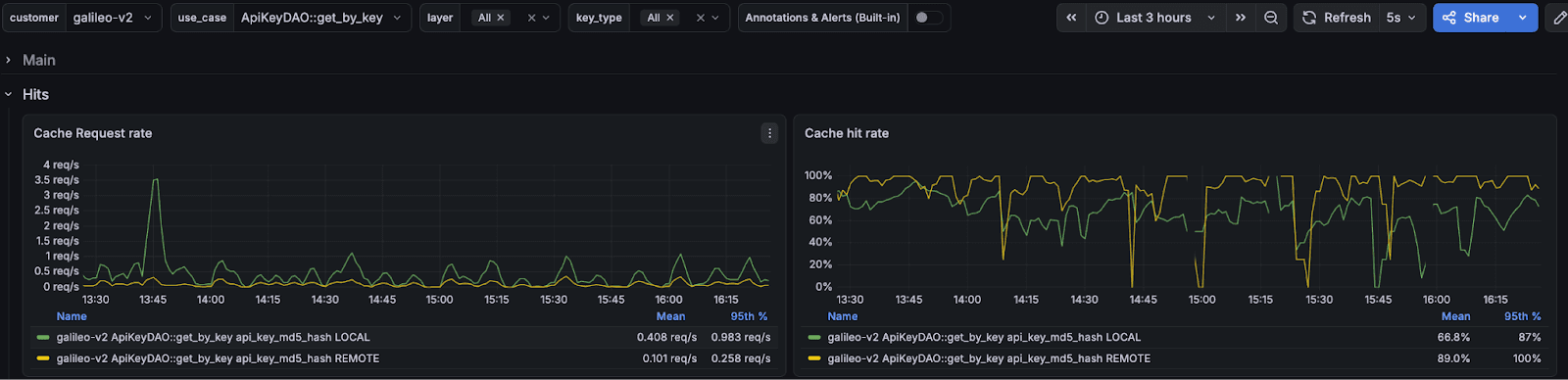
Built-in Observability
GCache exports Prometheus metrics out of the box, all labeled by use case, layer, and key type. You can finally answer the questions that actually matter:
Hit Ratios: How often is the cache actually serving requests, broken down by use case and layer?
Performance Details: Is the caching layer adding overhead? Lookup latency, serialization time, and fallback function time are all tracked.
Value sizes: Are cached values growing unexpectedly? Size histograms catch it.
Error Rates: Are there connection or parsing failures you don't know about?
Bypass Reasoning: Why was caching skipped for a given request? Context not enabled, fell outside the ramp percentage, or a config error. All tracked.
Multi-Layer Read-Through Cache
GCache uses a two-layer architecture: a local in-memory cache (per-instance) backed by Redis (shared across your fleet).
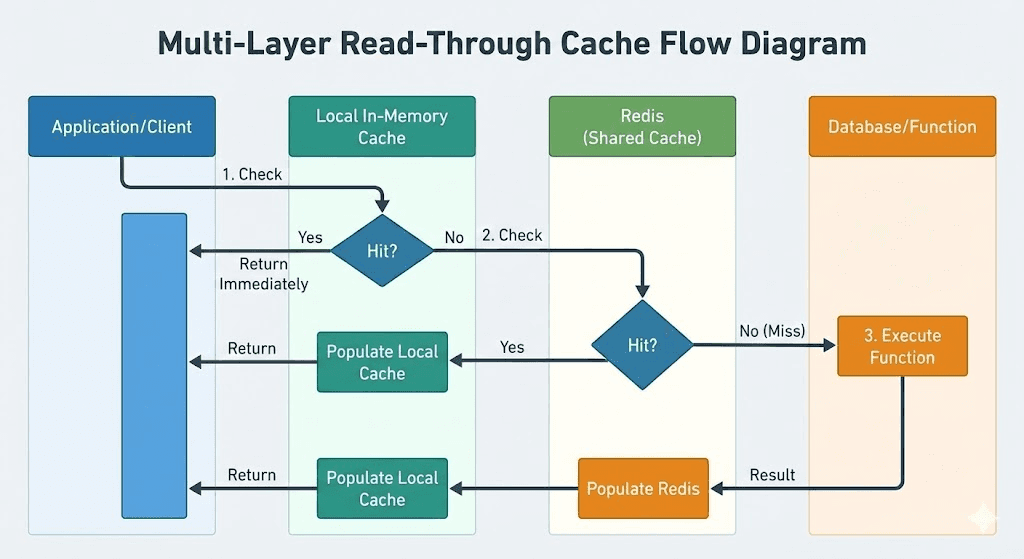
This reduces the load on Redis significantly. Most repeated reads within a short window hit the local cache and never touch the network.
Before/After: Caching API Key Verification at Galileo
One of our highest-traffic endpoints is /protect/invoke, part of our core product offering that provides real-time guardrails for AI applications. We noticed latency creeping up and used our function metrics dashboard to find the bottleneck.
The culprit: API key verification. Every request authenticates via API key, which involves a database lookup and bcrypt verification. This was adding significant latency to every request.
The fix was adding the @gcache.cached decorator to the lookup function; no other code changes required. We configured a 5-minute TTL via our runtime config service, then ramped the cache from 0% to 100%.
Results:
50%+ improvement in p50 and p75 latency
~10% improvement in p95 and p99 latency
40% reduction in CPU usage across API pods
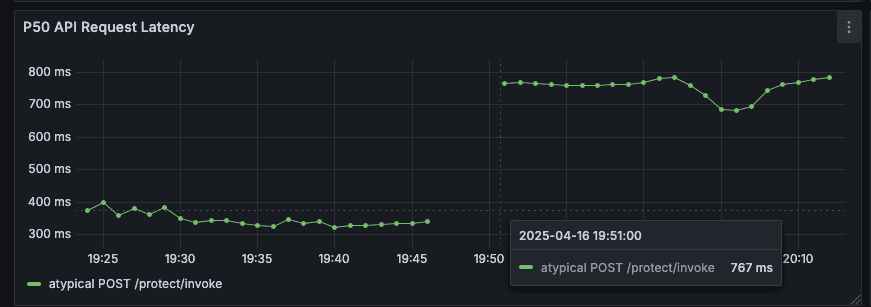
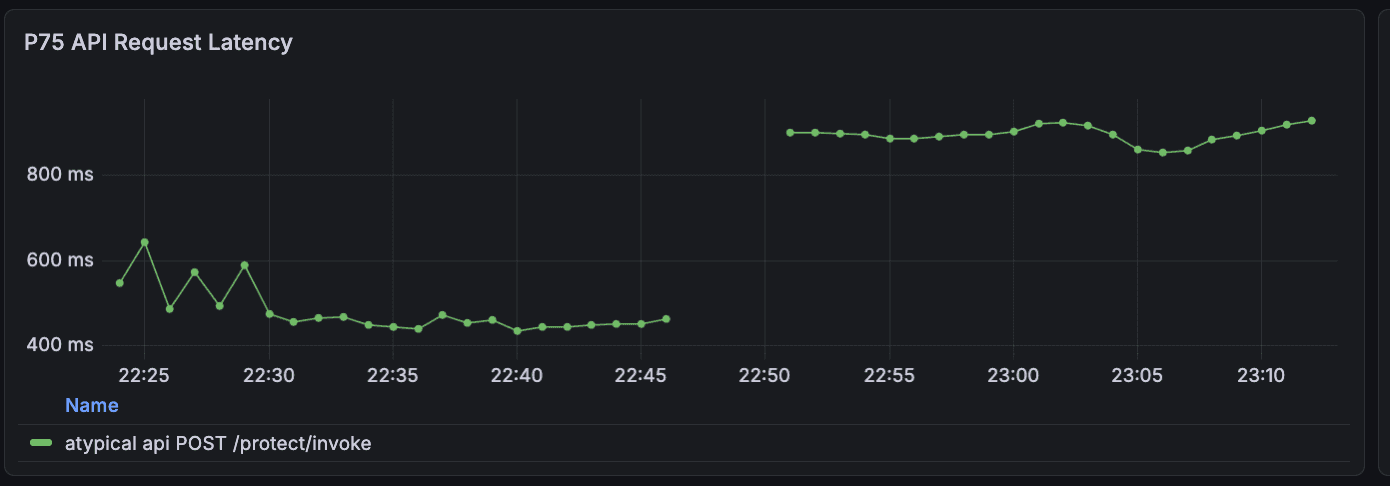
To validate that these results weren't noise, we ramped the cache back down to 0%, latency immediately returned to previous levels. This confirmed the improvement was real and gave us confidence to leave caching enabled.
We've since applied the same pattern to other hot paths: user lookup by email (10-15% latency improvement), stage configuration loading (7% RPS boost), and authorization checks. Each followed the same process: identify the bottleneck, add the decorator, ramp gradually, and measure.
The big thing was how quickly we could ship and validate caching changes without redeploying. When you can ramp a cache from 0% to 100% (or back) via a config change, experimentation becomes low-risk.
Conclusion
This is the second time I've built this pattern. The first was in Kotlin at DoorDash, and the problems were the same: inconsistent keys, no observability, all-or-nothing deployments, invalidation nightmares. The language changes, but the failure modes don't.
GCache is running in production at Galileo across multiple services, handling authentication, authorization, and configuration lookups. If you're dealing with similar performance challenges, give it a try. And if you find bugs or have feature requests, open an issue. PRs are welcome too.
Read more blogs from our engineering team:
You shipped fast. Your team prioritized features over optimizations, and that was the right call. You found product-market fit, landed customers, and kept the lights on. But now your endpoints are slow. You've got N+1 queries hiding in your API handlers, repeated calls to the same external services, and p99 latencies that make you nervous.
Slapping caching on top of existing code offers a quick way out, but caching comes with its own risks: inconsistent key patterns across the codebase, stale data bugs that are hard to reproduce, no visibility into what's actually being cached, and invalidation logic scattered everywhere. Without structure, caching becomes its own maintenance problem.
At Galileo, we hit this exact problem. We were shipping fast, performance issues piled up, and we needed a way to add caching incrementally without the usual risks. That’s why I built GCache. This isn't the first time I've tackled this; I previously built a similar library at DoorDash for their Kotlin microservices. It ended up being critical to scaling DashPass, and was adopted by many other teams as a performance engineering tool. GCache applies the same patterns to Python, as an opinionated wrapper around standard caching tools (Redis, cachetools) that adds the guardrails we needed.
GCache at a Glance
GCache is a small library which wraps Redis and cachetools with guardrails and observability:
Built-in Prometheus metrics — Hit rates, miss reasons, latencies, all broken down by use case and cache layer. Because "is the cache even working?" shouldn't require guesswork.
Gradual rollout with runtime kill switch — You can ramp from 0% to 100% per use case and dial it back without redeploying. Because shipping cache at 100% on day one is gambling.
Caching is off by default — You explicitly enable it where it's safe.
Entity-based invalidation — One call invalidates all caches for a user, org, or any entity. Because grepping for cache keys at 2am is not a life I want.
Multi-layer read-through cache — Local in-memory + Redis. Most repeated reads hit the local cache and never touch the network.
Fail-open by design — If Redis goes down, your function executes normally. A cache failure should never become a production outage.
Why "Just Add Caching" Is Scary
"There are only two hard things in computer science: cache invalidation and naming things." - Phil Karlton
Cache bugs are invisible. When something goes wrong, caching is rarely your first suspect. You're digging through database queries, checking API responses, reviewing business logic. Hours later you realize a stale cache entry was the culprit. Cache bugs are intermittent, timing-dependent, and leave no obvious trail. This makes every other caching problem harder to track down.
Operational difficulties. Beyond stale data, there's the operational side: you often have no idea if a cache is even helping, and when something does go wrong, turning it off means a full redeploy.
Invalidation hell. Your user updates their profile, and now you need to invalidate their cached data. But where is it cached? user_123? user:123:profile? getUserPosts_123? You grep the codebase, find 6 different caching calls for user data, manually construct each cache key, and invalidate them one by one, hoping you found them all. Inevitably, you miss one, and there's a stale data bug in production until someone notices.
GCache's Approach: Caching With Guardrails
The core idea is simple: make it safe to add caching to a production system one use case at a time.
Cache is Opt-In
Most caching libraries are "always on". Decorate a function, and it starts caching immediately. This is dangerous because it's easy to accidentally cache in write paths.
GCache flips this. Caching is OFF by default:
@gcache.cached(key_type="user_id", id_arg="user_id", use_case="GetUser")
async def get_user(user_id: str) -> dict:
    return await db.fetch_user(user_id)

# Caching OFF - function always executes fresh
result = await get_user("123")

# Caching ON - explicitly enabled for this code path
with gcache.enable():
    result = await get_user("123")
This forces you to consciously decide where caching is safe. Read-heavy API endpoints? Enable caching. Write paths where you're about to mutate data? Leave it disabled. The decorator marks what can be cached; the enable() context marks where it's safe to use the cache.
Gradual Rollout (Ramping)
Shipping caching shouldn't be an all-or-nothing bet. GCache lets you ramp up gradually:
# Start cautious - only 10% of requests use the cache
config = GCacheKeyConfig(
    ttl_sec={CacheLayer.LOCAL: 60, CacheLayer.REMOTE: 300},
    ramp={CacheLayer.LOCAL: 10, CacheLayer.REMOTE: 10}
)
The ramp parameter controls what percentage of requests use the cache. Start at 10%, watch your metrics, and dial up to 100% as you gain confidence.
More importantly, this is controlled via a runtime config provider, not hardcoded values:
async def config_provider(key: GCacheKey) -> GCacheKeyConfig | None:
    # Fetch config from your config service, database, feature flags, etc.
    return await config_service.get_cache_config(key.use_case)

gcache = GCache(GCacheConfig(cache_config_provider=config_provider))
The config provider is up to you. Database lookup, feature flag service, config file, whatever returns cache settings at runtime. Just make sure it can handle traffic.
Found a bug? Set the ramp to 0% in your config service, and it takes effect immediately, no redeploy required.
Here's how we did it at Galileo. We have a repository with a JSON file that maps each use case to its config (ramps and TTLs for both local and Redis layers). When that file is updated on main, CI uploads it to block storage. Our API pods periodically sync the file to the local filesystem, and the config provider just reads from disk and constructs GCacheKeyConfig objects from the JSON.
Structured Keys & Targeted Invalidation
GCache enforces a consistent cache key structure using URN format:
urn:prefix:user_id:123?page=1&sort=recent#GetUserPosts
Every cache key follows this pattern:
key_type(e.g.,user_id) — what entity is this cache about?id(e.g.,123) — which specific entity?args— other function arguments that affect the resultuse_case(e.g.,GetUserPosts) — which caching scenario?
This structure makes targeted invalidation possible:
# User updates their profile
await gcache.ainvalidate(key_type="user_id", id="12345")
That single call invalidates all cached data for user 12345. GetUser, GetUserPosts, GetUserSettings, everything. No more grepping the codebase for cache keys. No more hoping you found them all.
There's also a future_buffer_ms parameter that handles a race condition I kept running into: a read happens right before a write, and the stale data gets cached. The buffer tells GCache to reject any cache writes for the next N milliseconds after invalidation, closing that window.
await gcache.ainvalidate(
    key_type="user_id",
    id="12345",
    future_buffer_ms=5000,  # Reject cache writes for the next 5 seconds
)
Note: invalidation applies to the Redis layer. Local in-memory caches expire via TTL. For data where staleness after writes is unacceptable, configure local caching with a short TTL or disable it entirely.
One more thing: when you're debugging and need to inspect Redis directly, the keys are human-readable. You can immediately see what entity a cache entry belongs to and which code path created it.
Built-in Observability
GCache exports Prometheus metrics out of the box, all labeled by use case, layer, and key type. You can finally answer the questions that actually matter:
Hit Ratios: How often is the cache actually serving requests, broken down by use case and layer?
Performance Details: Is the caching layer adding overhead? Lookup latency, serialization time, and fallback function time are all tracked.
Value sizes: Are cached values growing unexpectedly? Size histograms catch it.
Error Rates: Are there connection or parsing failures you don't know about?
Bypass Reasoning: Why was caching skipped for a given request? Context not enabled, fell outside the ramp percentage, or a config error. All tracked.
Multi-Layer Read-Through Cache
GCache uses a two-layer architecture: a local in-memory cache (per-instance) backed by Redis (shared across your fleet).
This reduces the load on Redis significantly. Most repeated reads within a short window hit the local cache and never touch the network.
Before/After: Caching API Key Verification at Galileo
One of our highest-traffic endpoints is /protect/invoke, part of our core product offering that provides real-time guardrails for AI applications. We noticed latency creeping up and used our function metrics dashboard to find the bottleneck.
The culprit: API key verification. Every request authenticates via API key, which involves a database lookup and bcrypt verification. This was adding significant latency to every request.
The fix was adding the @gcache.cached decorator to the lookup function; no other code changes required. We configured a 5-minute TTL via our runtime config service, then ramped the cache from 0% to 100%.
Results:
50%+ improvement in p50 and p75 latency
~10% improvement in p95 and p99 latency
40% reduction in CPU usage across API pods
To validate that these results weren't noise, we ramped the cache back down to 0%, latency immediately returned to previous levels. This confirmed the improvement was real and gave us confidence to leave caching enabled.
We've since applied the same pattern to other hot paths: user lookup by email (10-15% latency improvement), stage configuration loading (7% RPS boost), and authorization checks. Each followed the same process: identify the bottleneck, add the decorator, ramp gradually, and measure.
The big thing was how quickly we could ship and validate caching changes without redeploying. When you can ramp a cache from 0% to 100% (or back) via a config change, experimentation becomes low-risk.
Conclusion
This is the second time I've built this pattern. The first was in Kotlin at DoorDash, and the problems were the same: inconsistent keys, no observability, all-or-nothing deployments, invalidation nightmares. The language changes, but the failure modes don't.
GCache is running in production at Galileo across multiple services, handling authentication, authorization, and configuration lookups. If you're dealing with similar performance challenges, give it a try. And if you find bugs or have feature requests, open an issue. PRs are welcome too.
Read more blogs from our engineering team:
You shipped fast. Your team prioritized features over optimizations, and that was the right call. You found product-market fit, landed customers, and kept the lights on. But now your endpoints are slow. You've got N+1 queries hiding in your API handlers, repeated calls to the same external services, and p99 latencies that make you nervous.
Slapping caching on top of existing code offers a quick way out, but caching comes with its own risks: inconsistent key patterns across the codebase, stale data bugs that are hard to reproduce, no visibility into what's actually being cached, and invalidation logic scattered everywhere. Without structure, caching becomes its own maintenance problem.
At Galileo, we hit this exact problem. We were shipping fast, performance issues piled up, and we needed a way to add caching incrementally without the usual risks. That’s why I built GCache. This isn't the first time I've tackled this; I previously built a similar library at DoorDash for their Kotlin microservices. It ended up being critical to scaling DashPass, and was adopted by many other teams as a performance engineering tool. GCache applies the same patterns to Python, as an opinionated wrapper around standard caching tools (Redis, cachetools) that adds the guardrails we needed.
GCache at a Glance
GCache is a small library which wraps Redis and cachetools with guardrails and observability:
Built-in Prometheus metrics — Hit rates, miss reasons, latencies, all broken down by use case and cache layer. Because "is the cache even working?" shouldn't require guesswork.
Gradual rollout with runtime kill switch — You can ramp from 0% to 100% per use case and dial it back without redeploying. Because shipping cache at 100% on day one is gambling.
Caching is off by default — You explicitly enable it where it's safe.
Entity-based invalidation — One call invalidates all caches for a user, org, or any entity. Because grepping for cache keys at 2am is not a life I want.
Multi-layer read-through cache — Local in-memory + Redis. Most repeated reads hit the local cache and never touch the network.
Fail-open by design — If Redis goes down, your function executes normally. A cache failure should never become a production outage.
Why "Just Add Caching" Is Scary
"There are only two hard things in computer science: cache invalidation and naming things." - Phil Karlton
Cache bugs are invisible. When something goes wrong, caching is rarely your first suspect. You're digging through database queries, checking API responses, reviewing business logic. Hours later you realize a stale cache entry was the culprit. Cache bugs are intermittent, timing-dependent, and leave no obvious trail. This makes every other caching problem harder to track down.
Operational difficulties. Beyond stale data, there's the operational side: you often have no idea if a cache is even helping, and when something does go wrong, turning it off means a full redeploy.
Invalidation hell. Your user updates their profile, and now you need to invalidate their cached data. But where is it cached? user_123? user:123:profile? getUserPosts_123? You grep the codebase, find 6 different caching calls for user data, manually construct each cache key, and invalidate them one by one, hoping you found them all. Inevitably, you miss one, and there's a stale data bug in production until someone notices.
GCache's Approach: Caching With Guardrails
The core idea is simple: make it safe to add caching to a production system one use case at a time.
Cache is Opt-In
Most caching libraries are "always on". Decorate a function, and it starts caching immediately. This is dangerous because it's easy to accidentally cache in write paths.
GCache flips this. Caching is OFF by default:
@gcache.cached(key_type="user_id", id_arg="user_id", use_case="GetUser")
async def get_user(user_id: str) -> dict:
    return await db.fetch_user(user_id)

# Caching OFF - function always executes fresh
result = await get_user("123")

# Caching ON - explicitly enabled for this code path
with gcache.enable():
    result = await get_user("123")
This forces you to consciously decide where caching is safe. Read-heavy API endpoints? Enable caching. Write paths where you're about to mutate data? Leave it disabled. The decorator marks what can be cached; the enable() context marks where it's safe to use the cache.
Gradual Rollout (Ramping)
Shipping caching shouldn't be an all-or-nothing bet. GCache lets you ramp up gradually:
# Start cautious - only 10% of requests use the cache
config = GCacheKeyConfig(
    ttl_sec={CacheLayer.LOCAL: 60, CacheLayer.REMOTE: 300},
    ramp={CacheLayer.LOCAL: 10, CacheLayer.REMOTE: 10}
)
The ramp parameter controls what percentage of requests use the cache. Start at 10%, watch your metrics, and dial up to 100% as you gain confidence.
More importantly, this is controlled via a runtime config provider, not hardcoded values:
async def config_provider(key: GCacheKey) -> GCacheKeyConfig | None:
    # Fetch config from your config service, database, feature flags, etc.
    return await config_service.get_cache_config(key.use_case)

gcache = GCache(GCacheConfig(cache_config_provider=config_provider))
The config provider is up to you. Database lookup, feature flag service, config file, whatever returns cache settings at runtime. Just make sure it can handle traffic.
Found a bug? Set the ramp to 0% in your config service, and it takes effect immediately, no redeploy required.
Here's how we did it at Galileo. We have a repository with a JSON file that maps each use case to its config (ramps and TTLs for both local and Redis layers). When that file is updated on main, CI uploads it to block storage. Our API pods periodically sync the file to the local filesystem, and the config provider just reads from disk and constructs GCacheKeyConfig objects from the JSON.
Structured Keys & Targeted Invalidation
GCache enforces a consistent cache key structure using URN format:
urn:prefix:user_id:123?page=1&sort=recent#GetUserPosts
Every cache key follows this pattern:
key_type(e.g.,user_id) — what entity is this cache about?id(e.g.,123) — which specific entity?args— other function arguments that affect the resultuse_case(e.g.,GetUserPosts) — which caching scenario?
This structure makes targeted invalidation possible:
# User updates their profile
await gcache.ainvalidate(key_type="user_id", id="12345")
That single call invalidates all cached data for user 12345. GetUser, GetUserPosts, GetUserSettings, everything. No more grepping the codebase for cache keys. No more hoping you found them all.
There's also a future_buffer_ms parameter that handles a race condition I kept running into: a read happens right before a write, and the stale data gets cached. The buffer tells GCache to reject any cache writes for the next N milliseconds after invalidation, closing that window.
await gcache.ainvalidate(
    key_type="user_id",
    id="12345",
    future_buffer_ms=5000,  # Reject cache writes for the next 5 seconds
)
Note: invalidation applies to the Redis layer. Local in-memory caches expire via TTL. For data where staleness after writes is unacceptable, configure local caching with a short TTL or disable it entirely.
One more thing: when you're debugging and need to inspect Redis directly, the keys are human-readable. You can immediately see what entity a cache entry belongs to and which code path created it.
Built-in Observability
GCache exports Prometheus metrics out of the box, all labeled by use case, layer, and key type. You can finally answer the questions that actually matter:
Hit Ratios: How often is the cache actually serving requests, broken down by use case and layer?
Performance Details: Is the caching layer adding overhead? Lookup latency, serialization time, and fallback function time are all tracked.
Value sizes: Are cached values growing unexpectedly? Size histograms catch it.
Error Rates: Are there connection or parsing failures you don't know about?
Bypass Reasoning: Why was caching skipped for a given request? Context not enabled, fell outside the ramp percentage, or a config error. All tracked.
Multi-Layer Read-Through Cache
GCache uses a two-layer architecture: a local in-memory cache (per-instance) backed by Redis (shared across your fleet).
This reduces the load on Redis significantly. Most repeated reads within a short window hit the local cache and never touch the network.
Before/After: Caching API Key Verification at Galileo
One of our highest-traffic endpoints is /protect/invoke, part of our core product offering that provides real-time guardrails for AI applications. We noticed latency creeping up and used our function metrics dashboard to find the bottleneck.
The culprit: API key verification. Every request authenticates via API key, which involves a database lookup and bcrypt verification. This was adding significant latency to every request.
The fix was adding the @gcache.cached decorator to the lookup function; no other code changes required. We configured a 5-minute TTL via our runtime config service, then ramped the cache from 0% to 100%.
Results:
50%+ improvement in p50 and p75 latency
~10% improvement in p95 and p99 latency
40% reduction in CPU usage across API pods
To validate that these results weren't noise, we ramped the cache back down to 0%, latency immediately returned to previous levels. This confirmed the improvement was real and gave us confidence to leave caching enabled.
We've since applied the same pattern to other hot paths: user lookup by email (10-15% latency improvement), stage configuration loading (7% RPS boost), and authorization checks. Each followed the same process: identify the bottleneck, add the decorator, ramp gradually, and measure.
The big thing was how quickly we could ship and validate caching changes without redeploying. When you can ramp a cache from 0% to 100% (or back) via a config change, experimentation becomes low-risk.
Conclusion
This is the second time I've built this pattern. The first was in Kotlin at DoorDash, and the problems were the same: inconsistent keys, no observability, all-or-nothing deployments, invalidation nightmares. The language changes, but the failure modes don't.
GCache is running in production at Galileo across multiple services, handling authentication, authorization, and configuration lookups. If you're dealing with similar performance challenges, give it a try. And if you find bugs or have feature requests, open an issue. PRs are welcome too.
Read more blogs from our engineering team:
You shipped fast. Your team prioritized features over optimizations, and that was the right call. You found product-market fit, landed customers, and kept the lights on. But now your endpoints are slow. You've got N+1 queries hiding in your API handlers, repeated calls to the same external services, and p99 latencies that make you nervous.
Slapping caching on top of existing code offers a quick way out, but caching comes with its own risks: inconsistent key patterns across the codebase, stale data bugs that are hard to reproduce, no visibility into what's actually being cached, and invalidation logic scattered everywhere. Without structure, caching becomes its own maintenance problem.
At Galileo, we hit this exact problem. We were shipping fast, performance issues piled up, and we needed a way to add caching incrementally without the usual risks. That’s why I built GCache. This isn't the first time I've tackled this; I previously built a similar library at DoorDash for their Kotlin microservices. It ended up being critical to scaling DashPass, and was adopted by many other teams as a performance engineering tool. GCache applies the same patterns to Python, as an opinionated wrapper around standard caching tools (Redis, cachetools) that adds the guardrails we needed.
GCache at a Glance
GCache is a small library which wraps Redis and cachetools with guardrails and observability:
Built-in Prometheus metrics — Hit rates, miss reasons, latencies, all broken down by use case and cache layer. Because "is the cache even working?" shouldn't require guesswork.
Gradual rollout with runtime kill switch — You can ramp from 0% to 100% per use case and dial it back without redeploying. Because shipping cache at 100% on day one is gambling.
Caching is off by default — You explicitly enable it where it's safe.
Entity-based invalidation — One call invalidates all caches for a user, org, or any entity. Because grepping for cache keys at 2am is not a life I want.
Multi-layer read-through cache — Local in-memory + Redis. Most repeated reads hit the local cache and never touch the network.
Fail-open by design — If Redis goes down, your function executes normally. A cache failure should never become a production outage.
Why "Just Add Caching" Is Scary
"There are only two hard things in computer science: cache invalidation and naming things." - Phil Karlton
Cache bugs are invisible. When something goes wrong, caching is rarely your first suspect. You're digging through database queries, checking API responses, reviewing business logic. Hours later you realize a stale cache entry was the culprit. Cache bugs are intermittent, timing-dependent, and leave no obvious trail. This makes every other caching problem harder to track down.
Operational difficulties. Beyond stale data, there's the operational side: you often have no idea if a cache is even helping, and when something does go wrong, turning it off means a full redeploy.
Invalidation hell. Your user updates their profile, and now you need to invalidate their cached data. But where is it cached? user_123? user:123:profile? getUserPosts_123? You grep the codebase, find 6 different caching calls for user data, manually construct each cache key, and invalidate them one by one, hoping you found them all. Inevitably, you miss one, and there's a stale data bug in production until someone notices.
GCache's Approach: Caching With Guardrails
The core idea is simple: make it safe to add caching to a production system one use case at a time.
Cache is Opt-In
Most caching libraries are "always on". Decorate a function, and it starts caching immediately. This is dangerous because it's easy to accidentally cache in write paths.
GCache flips this. Caching is OFF by default:
@gcache.cached(key_type="user_id", id_arg="user_id", use_case="GetUser")
async def get_user(user_id: str) -> dict:
    return await db.fetch_user(user_id)

# Caching OFF - function always executes fresh
result = await get_user("123")

# Caching ON - explicitly enabled for this code path
with gcache.enable():
    result = await get_user("123")
This forces you to consciously decide where caching is safe. Read-heavy API endpoints? Enable caching. Write paths where you're about to mutate data? Leave it disabled. The decorator marks what can be cached; the enable() context marks where it's safe to use the cache.
Gradual Rollout (Ramping)
Shipping caching shouldn't be an all-or-nothing bet. GCache lets you ramp up gradually:
# Start cautious - only 10% of requests use the cache
config = GCacheKeyConfig(
    ttl_sec={CacheLayer.LOCAL: 60, CacheLayer.REMOTE: 300},
    ramp={CacheLayer.LOCAL: 10, CacheLayer.REMOTE: 10}
)
The ramp parameter controls what percentage of requests use the cache. Start at 10%, watch your metrics, and dial up to 100% as you gain confidence.
More importantly, this is controlled via a runtime config provider, not hardcoded values:
async def config_provider(key: GCacheKey) -> GCacheKeyConfig | None:
    # Fetch config from your config service, database, feature flags, etc.
    return await config_service.get_cache_config(key.use_case)

gcache = GCache(GCacheConfig(cache_config_provider=config_provider))
The config provider is up to you. Database lookup, feature flag service, config file, whatever returns cache settings at runtime. Just make sure it can handle traffic.
Found a bug? Set the ramp to 0% in your config service, and it takes effect immediately, no redeploy required.
Here's how we did it at Galileo. We have a repository with a JSON file that maps each use case to its config (ramps and TTLs for both local and Redis layers). When that file is updated on main, CI uploads it to block storage. Our API pods periodically sync the file to the local filesystem, and the config provider just reads from disk and constructs GCacheKeyConfig objects from the JSON.
Structured Keys & Targeted Invalidation
GCache enforces a consistent cache key structure using URN format:
urn:prefix:user_id:123?page=1&sort=recent#GetUserPosts
Every cache key follows this pattern:
key_type(e.g.,user_id) — what entity is this cache about?id(e.g.,123) — which specific entity?args— other function arguments that affect the resultuse_case(e.g.,GetUserPosts) — which caching scenario?
This structure makes targeted invalidation possible:
# User updates their profile
await gcache.ainvalidate(key_type="user_id", id="12345")
That single call invalidates all cached data for user 12345. GetUser, GetUserPosts, GetUserSettings, everything. No more grepping the codebase for cache keys. No more hoping you found them all.
There's also a future_buffer_ms parameter that handles a race condition I kept running into: a read happens right before a write, and the stale data gets cached. The buffer tells GCache to reject any cache writes for the next N milliseconds after invalidation, closing that window.
await gcache.ainvalidate(
    key_type="user_id",
    id="12345",
    future_buffer_ms=5000,  # Reject cache writes for the next 5 seconds
)
Note: invalidation applies to the Redis layer. Local in-memory caches expire via TTL. For data where staleness after writes is unacceptable, configure local caching with a short TTL or disable it entirely.
One more thing: when you're debugging and need to inspect Redis directly, the keys are human-readable. You can immediately see what entity a cache entry belongs to and which code path created it.
Built-in Observability
GCache exports Prometheus metrics out of the box, all labeled by use case, layer, and key type. You can finally answer the questions that actually matter:
Hit Ratios: How often is the cache actually serving requests, broken down by use case and layer?
Performance Details: Is the caching layer adding overhead? Lookup latency, serialization time, and fallback function time are all tracked.
Value sizes: Are cached values growing unexpectedly? Size histograms catch it.
Error Rates: Are there connection or parsing failures you don't know about?
Bypass Reasoning: Why was caching skipped for a given request? Context not enabled, fell outside the ramp percentage, or a config error. All tracked.
Multi-Layer Read-Through Cache
GCache uses a two-layer architecture: a local in-memory cache (per-instance) backed by Redis (shared across your fleet).
This reduces the load on Redis significantly. Most repeated reads within a short window hit the local cache and never touch the network.
Before/After: Caching API Key Verification at Galileo
One of our highest-traffic endpoints is /protect/invoke, part of our core product offering that provides real-time guardrails for AI applications. We noticed latency creeping up and used our function metrics dashboard to find the bottleneck.
The culprit: API key verification. Every request authenticates via API key, which involves a database lookup and bcrypt verification. This was adding significant latency to every request.
The fix was adding the @gcache.cached decorator to the lookup function; no other code changes required. We configured a 5-minute TTL via our runtime config service, then ramped the cache from 0% to 100%.
Results:
50%+ improvement in p50 and p75 latency
~10% improvement in p95 and p99 latency
40% reduction in CPU usage across API pods
To validate that these results weren't noise, we ramped the cache back down to 0%, latency immediately returned to previous levels. This confirmed the improvement was real and gave us confidence to leave caching enabled.
We've since applied the same pattern to other hot paths: user lookup by email (10-15% latency improvement), stage configuration loading (7% RPS boost), and authorization checks. Each followed the same process: identify the bottleneck, add the decorator, ramp gradually, and measure.
The big thing was how quickly we could ship and validate caching changes without redeploying. When you can ramp a cache from 0% to 100% (or back) via a config change, experimentation becomes low-risk.
Conclusion
This is the second time I've built this pattern. The first was in Kotlin at DoorDash, and the problems were the same: inconsistent keys, no observability, all-or-nothing deployments, invalidation nightmares. The language changes, but the failure modes don't.
GCache is running in production at Galileo across multiple services, handling authentication, authorization, and configuration lookups. If you're dealing with similar performance challenges, give it a try. And if you find bugs or have feature requests, open an issue. PRs are welcome too.
Read more blogs from our engineering team:

Lev Neiman